3D on a Live Site: Our three.js Experiment and What Google Saw




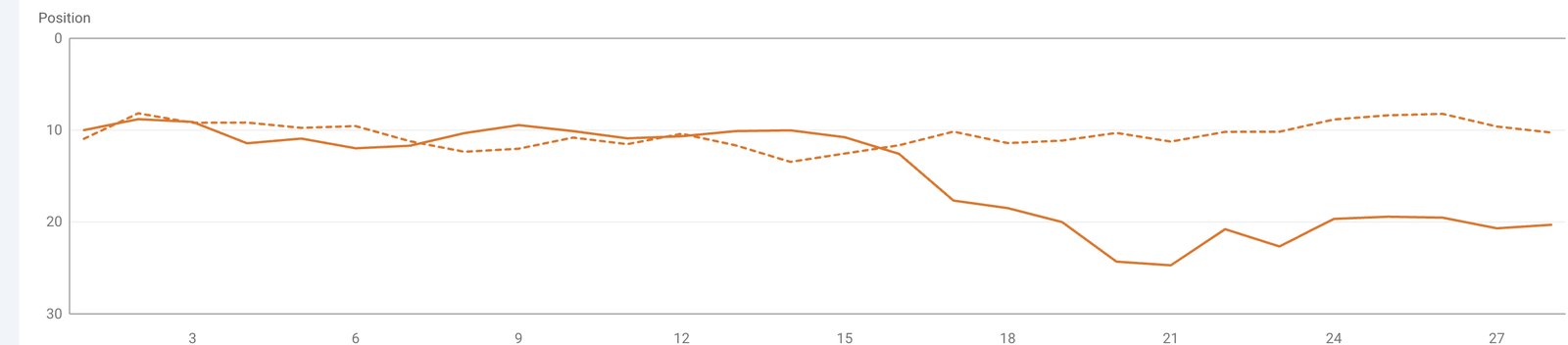
In October we deliberately put a three.js tunnel on the first screen of our own website, the one that brings us leads. A few days later mobile PageSpeed said 32 and our average position in Search Console slid from about 10 to 17. Here is why we ran this test on live traffic, what we found, and what we changed without giving up the 3D.
IN SHORT
Does 3D hurt SEO?
3D on its own does not hurt search. It hurts when the text lives inside a canvas, when the heavy part loads on every device whether or not it can draw it, and when test browsers break on it. Google reads the HTML a page serves, and it judges speed by what real visitors experience, not by a lab score.
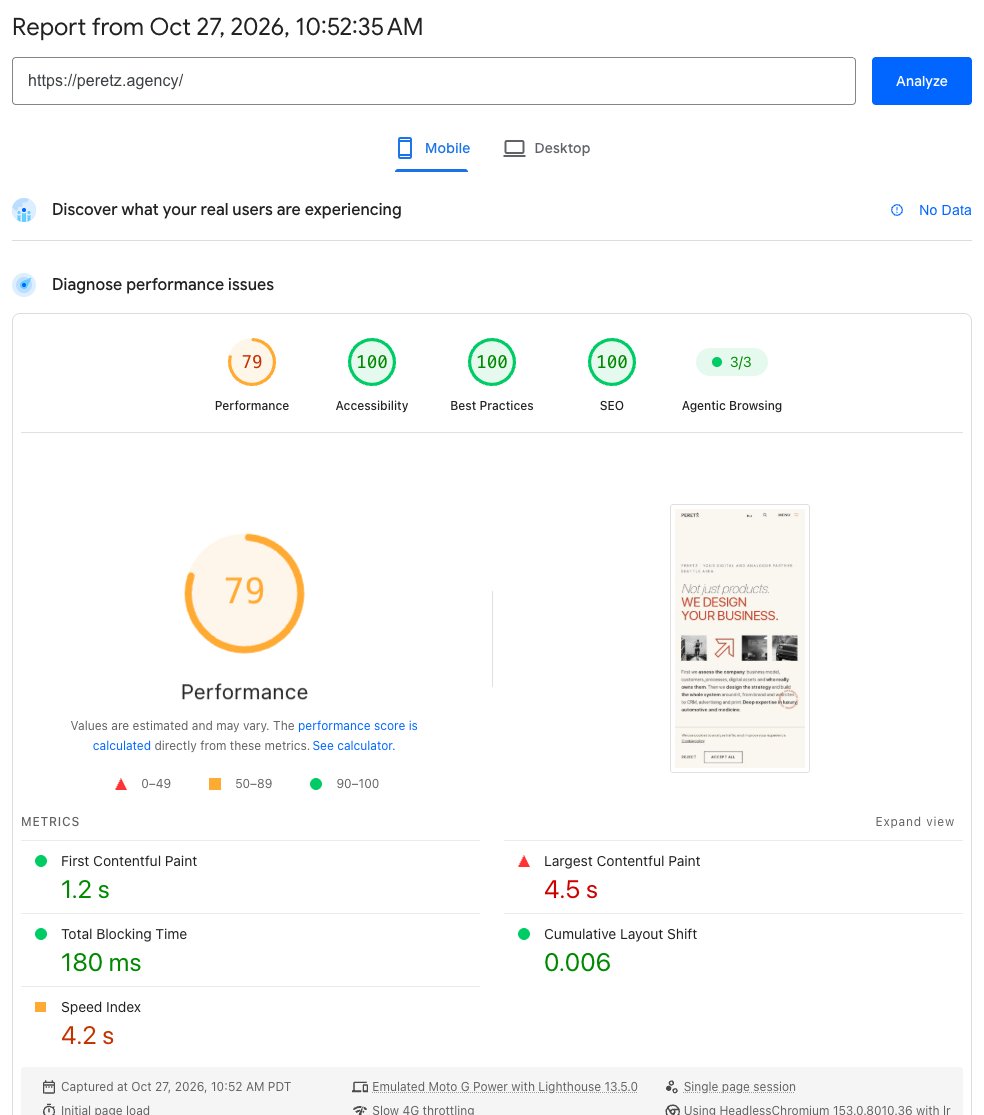
On October 16, 2026 the first screen of peretz.agency became a three.js scene: a tunnel our projects float through. We did this on purpose, on a site with live search traffic. For the first days everything looked fine. A recheck a few days later gave the home page 32 out of 100 on mobile PageSpeed with 16 seconds of blocked main thread, and the site's average position in Search Console slid from about 10 to 17 within a week. By October 27, after a handful of small fixes, the same page, with the same 3D for everyone whose device has a graphics chip, scores 78 on mobile and 96 on desktop.
The text is the page. The 3D is the light on it.
What follows is what we found, in the order we found it. None of it required rewriting the scene itself. This is the same site we moved from Laravel 7 to 13 a few weeks earlier, so the server side was already in order; this time all the work happened in the browser.
THE EXPERIMENT
Why our own site and not a pet project
You can try a new approach on a demo stand or a pet project, and plenty of teams do. A pet project lacks everything that makes this kind of test worth running: search traffic, a Search Console history, visitors on old phones and office laptops, and people who open PageSpeed before they write to us. On a stand, 3D nearly always looks great, because the only people looking at it are the team, on good hardware.
So we put three.js on our own working site and agreed on the rules in advance. We watch PageSpeed and Search Console from the first days. If the numbers drop, we find the cause and fix it as we go, instead of rolling everything back at the first bad score. And we publish what we find, including the unpleasant parts.
A pet project will never show you how a site with traffic behaves.
The risk was deliberate, and it was ours. If something went wrong, our rankings and our leads would take the hit, not a client's. In exchange, when someone asks us whether a site can have 3D without losing search, we answer from our own data rather than from documentation and other people's case studies.
THE SITE
What we built
The 3D is more than one effect on the home page. Within two weeks it had spread across the whole site:
- Home: the first screen is a three.js tunnel of our projects, with a 3D car model and ambient music.
- Footer: small 3D objects on every page, each in its own small canvas in its own spot, with no shared canvas laid over the whole page.
- Portfolio: a full-width 3D mosaic of every project that you can drag around.
- Contact: a small diorama of Seattle with Mount Rainier, the Space Needle, orcas and a ferry.
- Careers: a toy rocket that launches from the footer when the reader reaches it.
- 404: the digits are glossy 3D shapes you can spin.
All of it runs on one shared copy of three.js, loaded once for the whole site. And all of it is decoration. Every heading, paragraph, link and price stays plain HTML that the server sends before any script runs.
THE SIGNAL
What PageSpeed and Search Console showed
PageSpeed Insights runs Lighthouse in a Google data center. For the mobile test it emulates a mid-range phone: a throttled network and a throttled CPU. What it does not have is a graphics chip. WebGL still works there, but Chrome draws it in software, on the CPU, through the SwiftShader renderer.
For a three.js scene that is the worst case. Work a phone hands to its graphics chip and finishes in a few milliseconds lands on a CPU that is already slowed down. Lighthouse counted 16 seconds of Total Blocking Time, the time during which the page could not respond to a tap. The score followed.
A visitor with a current phone never saw those 16 seconds. We still did not write the 32 off as a lab quirk, for two reasons. Low-end phones and office laptops without a real graphics chip exist, and their owners get exactly that software path. And clients, partners and competitors open PageSpeed too. A studio that sells websites cannot answer them with "it's fine on my phone."
In the same days rankings slipped: the site's average position in Search Console went from about 10 to 17 over a week. Clicks and impressions over the same four weeks actually grew, though the credit goes elsewhere: all that time we kept publishing new articles and service pages. That detail matters. Average position is calculated across every query the site appeared for, so it gets worse both when pages lose places and when the site starts showing up for new queries below the first page. A number like that has to be broken down by page and by date, before and after the launch, rather than read as a single figure.
We cannot tie the drop directly to the 3D: field data for Core Web Vitals takes 28 days to build up, and a lot changed on the site at once during those days. So we treated it as an early signal, with no panic and no rollback: something on the site had changed, and the time to dig in was now, not a month later when the field data arrived. That signal is the reason we ran the experiment on a live site in the first place.
LAB AND FIELD
What Google actually measures
Speed data comes in two kinds, and they are easy to mix up.
Lab data is a single test run under controlled conditions. Lighthouse, the PageSpeed score and the Chrome DevTools report all belong here. They are reproducible and good for finding problems.
Field data is what real Chrome users experienced on the page over the last 28 days, collected in the Chrome UX Report (CrUX). This is what the Core Web Vitals report in Search Console shows, and it is the data Google means when it says good Core Web Vitals align with what its core ranking systems seek to reward. Each metric is judged at the 75th percentile of visits:
| Core Web Vital | What it measures | Good |
|---|---|---|
| Largest Contentful Paint (LCP) | Loading | 2.5 s or less |
| Interaction to Next Paint (INP) | Response to input | 200 ms or less |
| Cumulative Layout Shift (CLS) | Layout stability | 0.1 or less |
The number at the top of a PageSpeed report is not on that list. A lab 32 does not move rankings directly. What it predicts is real enough, though: if the main thread is blocked in the lab, the weakest real devices will feel it in INP, and they are exactly the ones that make up the worst quarter of visits.
The second thing Google measures is content. Google Search renders pages in an up-to-date headless Chromium and then reads the resulting HTML. Text drawn inside a canvas is pixels to it, not words. That is why every word on our 3D screens is HTML on top of the scene, starting with the single H1 on the page. How rendering, speed and content add up in search today is covered in our article on SEO, AEO and GEO in 2026.
A lab score is a symptom. Field data is the diagnosis.
CRASHES
When the test could not even finish
Before we could improve the score, we had to get one. For a while PageSpeed answered "Browser tab has unexpectedly crashed" on every page of the site, not just the home page.
We tracked the causes down by publishing static copies of a page, removing parts one at a time and running each copy through PageSpeed. There were two.
The service worker. The site is a PWA: a service worker caches pages for offline use and receives push notifications. It registered as soon as the page loaded. Our hosting rejects requests with the HeadlessChrome user agent that test tools use, and the worker script is requested with exactly that agent. Registering on load in that situation crashed the test tab. Now the worker registers on the first tap, click or key press, and on load only if a worker already controls the page. People notice no difference; a test browser that never touches the page never starts it.
Page-tall canvases. Our scenes adapt to the screen size. Some test browsers, Lighthouse included when it takes a full-page screenshot, stretch the window to the full height of the page. A canvas tied to the window height then becomes a 3D surface 16,000 pixels tall on the home page and 10,240 on the portfolio. Now every such canvas has a maximum height: 2,200 pixels for the home scene, taller than any real screen, and 980 pixels for the portfolio mosaic on phones.
A test browser is not a visitor, but it must reach the end.
After those two fixes PageSpeed worked again. The home page earned its 32 fair and square.
GPU CHECK
3D only where a graphics chip draws it
The 32 came from software WebGL. So the obvious move was to stop sending the scene where nothing can draw it, rather than to make it lighter for everyone.
Right after the markup of the first screen, before the browser paints anything, a short inline script asks the device three questions:
- Can it draw WebGL at all without a major performance hit? The script requests a context with the failIfMajorPerformanceCaveat flag, which tells the browser to refuse rather than fall back to something slow.
- Who is drawing? The renderer name. SwiftShader, llvmpipe and other software renderers mean there is no graphics chip doing the work.
- Has the visitor asked for less motion? The prefers-reduced-motion system setting.
If any answer is wrong, the first screen gets the light version: the same headline, the same text and links in the site's classic light look, and three.js is never downloaded. If every answer is right, the same script adds a preload for three.js and the scene itself. There are no static script tags for them on the page.
The check has a cost. On a machine without a graphics chip, any question to the GPU costs about 0.4 seconds while Chrome starts up the software renderer. We accept that, because the alternative is many seconds of a scene the device cannot draw. We tried asking WebGPU instead. It only answers after the first paint, so the page showed one version and then switched to the other, and Lighthouse measured a layout shift of 1, ten times the limit. We dropped that option.
There is a safety net too: if the scene has drawn nothing eight seconds after it starts, the page marks itself as running without WebGL and shows the static version.
In a local Lighthouse run with software graphics, the home page went from 32 to between 72 and 76 across runs, and Total Blocking Time fell from 16 seconds to zero.

NOT CLOAKING
One HTML for everyone
Showing different visitors different things sounds close to cloaking, and cloaking violates Google's spam policies. The difference lies in what the decision is based on.
Cloaking means showing search engines and people different content to influence rankings, usually by checking who is asking: the crawler's user agent or IP address.
Our server sends the same HTML to everyone: Googlebot, PageSpeed, an iPhone, an office PC. The choice happens later, in the browser, and depends only on what the device can do. A person on a laptop without a graphics chip sees the same light version as a test browser without one. A crawler whose browser has a real graphics chip gets the scene, and without one it gets the light version, exactly like a person. The headline, text and every link are identical in both versions.
Decide by what the device can do, never by who is asking.
LATER
Everything else waits for a reason
The first screen was the biggest line item, but not the only one. The rule for the rest of the site is simple: nothing heavy loads until there is a reason for it.
- Sound: the audio graph for the ambient music used to be built on load and cost about 0.3 seconds. Now it is built on the first tap, click or key press. A visit where the music is already playing picks it up on the next page right away.
- Footer 3D: its script starts when the footer is about 800 pixels away (350 on phones) and the browser has a spare moment. Each object draws in its own small canvas, so there is never a full-screen 3D layer over the text.
- Contact: the Seattle diorama downloads after the page has loaded, when the browser is idle.
- Careers: three.js for the rocket is requested when the footer is about 900 pixels away, early enough to be ready and late enough to stay out of the page's way.
- Visitors who ask for less motion get no rocket at all, and see the light first screen on the home page.
LAYOUT SHIFTS
It was not the 3D that moved the page
Once the 3D was under control, the remaining Core Web Vitals problems turned up somewhere else entirely: in ordinary blocks that scripts built after the first paint.
- The article table of contents on phones. A script assembled it from the headings after the text had appeared, and pushed the text down. Now the server renders the same table of contents straight into the HTML, and the script only picks it up. CLS on article pages fell from 0.19 to 0.
- The blog category bar. It decides whether the categories fit on one line or open into two columns. While a script made that call after paint, the page jumped: CLS 0.5. Now a few lines right after the bar decide it before the first paint. CLS 0.
Neither had anything to do with three.js. It is the usual lesson of performance work: measure first, because the expensive part is almost never the one everyone suspects. On a three-page pet project with no blog and no tables of contents, we would never have seen it.
CHECKLIST
Before you launch a 3D site
What we would check on any site with three.js, WebGL or another heavy visual layer, ours included:
- All text, headings and links are HTML, outside the canvas, and present in the page source before any script runs.
- One H1, real text, not part of an image or a scene.
- The scene loads only where a graphics chip will draw it, decided before the first paint, with a light version for everyone else and for reduced motion.
- The same HTML for every visitor and every bot. The decision happens in the browser, by device capability, never on the server by user agent.
- Every canvas tied to the window height has a maximum height.
- Nothing that trips up test browsers runs on load: service workers, sound, heavy observers. Start them on the visitor's first interaction.
- Secondary scenes load near their spot on the page or when the browser is idle, never all at once.
- Layout is fixed before the first paint: blocks that scripts build get their markup or size from the server.
- Launch on the live site with a monitoring plan: PageSpeed and Search Console from the first days, and a readiness to fix as you go instead of rolling back at the first bad number.
- Lab tests to find problems, field data once a month: PageSpeed finds the problems, the Core Web Vitals report in Search Console shows what Google sees. We watch both as part of website promotion.
RESULT
Where we are now
| Home page | Before | After |
|---|---|---|
| PageSpeed, mobile | 32 | 78 |
| PageSpeed, desktop | not measured | 96 |
| Total Blocking Time, local Lighthouse with software graphics | 16 s | 0 |
| Tallest canvas in a test browser | 16,000 px | 2,200 px |
| CLS on article pages | 0.19 | 0 |
| CLS on blog pages | 0.5 | 0 |
PageSpeed figures are from October 27, 2026; lab results drift by a few points from run to run. The 3D is still there for everyone whose device can draw it, the music still plays, and the rocket still launches on the careers page.
What we do not have yet is a long field history after the changes: CrUX collects 28 days of real visits, so the full picture in Search Console, including whether the average position returns from 17 to where it was around 10, will come later. We will add it to this article when we have it, whatever it shows.
A 3D site and a site that search engines read well are not an either-or choice. They become one only when the scene is allowed to decide what the page is. And the place to test that is where there is real traffic, starting with your own site.
FAQ
Frequently asked questions
Does a three.js or WebGL website hurt SEO?
Not on its own. Google renders the page in Chromium and reads its HTML, so text, headings and links need to be HTML outside the canvas. Speed is judged by the Core Web Vitals of real visitors. A heavy scene that loads on every device can drag those metrics down on low-end phones, so it should load only where a graphics chip will draw it.
Why is PageSpeed so low on a 3D website?
The mobile PageSpeed test runs without a graphics chip, so Chrome draws WebGL in software on a deliberately throttled CPU. A scene that is light for a real phone turns into many seconds of blocked main thread. That is why our home page showed 32 and 16 seconds of Total Blocking Time.
Does the PageSpeed score affect rankings?
Not directly. The score is lab data from a single run. Google uses the Core Web Vitals of real Chrome users, collected over 28 days and judged at the 75th percentile: LCP of 2.5 seconds or less, INP of 200 milliseconds or less, CLS of 0.1 or less. A low lab score is still worth fixing, because it usually shows what the weakest real devices feel.
Is serving a lighter version without 3D cloaking?
No, as long as the server sends the same HTML to everyone and the browser chooses by device capability. Cloaking means showing search engines something other than what people see, usually by checking the user agent. Our light version has the same headline, text and links, and any visitor without a graphics chip sees it, human or bot.
Should you test 3D straight away on a site with traffic?
Yes, if you are ready to watch PageSpeed and Search Console from the first days and fix what you find quickly. A demo stand will show that the scene works, but not how low-end devices of real visitors, test browsers and search will cope with it. We started with our own site so that the traffic at risk was ours, not a client's.
Should you remove 3D from a site for the sake of rankings?
Usually not. First find out where the losses come from. In our case the score was dragged down by software rendering, test browsers stretching canvases, and blocks that shifted after the first paint, not by the 3D as such. After the fixes the home page went from 32 to 78 on mobile, and the scene stayed.
How do you know whether your 3D site is fast for real visitors?
Open the Core Web Vitals report in Search Console, or the field data block at the top of PageSpeed Insights if the site has enough traffic to be in the Chrome UX Report. Run Lighthouse too, but treat it as a way to find problems, not as a verdict.
Sources
- Google Search Central: Understand the JavaScript SEO basics
- Google Search Central: Understanding Core Web Vitals and Google search results
- Google Search Central: Understanding page experience in Google Search results
- Google Search Central: Spam policies for Google web search (cloaking)
- web.dev: Why lab and field data can be different
- Chrome for Developers: Chrome UX Report
- Chrome for Developers: Lighthouse performance scoring
- Lighthouse: Network and CPU throttling
- MDN: WEBGL_debug_renderer_info
- MDN: HTMLCanvasElement.getContext() and failIfMajorPerformanceCaveat
- MDN: prefers-reduced-motion
Want a 3D website that loads fast and reads well to search engines? Let's take a look at yours.
- Share
-

-

-

-

One notification a week with the new PERETZ articles. Nothing else.
Related Reading
-
01. 10. 2026

Six Laravel Versions in Three Days

-
17. 08. 2026

SEO, AEO, and GEO in 2026: What Actually Matters to Google, and What Your Marketer's Report Should Show
-
19. 10. 2026

Website Design for Architecture Firms: What Clients Look For Before They Call
-
29. 09. 2026

Upgrading an Old Laravel or PHP Site in 2026