Google Indexing Audit: The Pages That Sell Were Missing


Search Console went quiet, so we checked every page ourselves: the blog was in Google, the pages that sell mostly were not. What we found, what we changed and how to repeat it.
For several weeks the Page indexing report in our Search Console did not reflect what was happening on our site. We published new articles, rewrote service pages and fixed canonicals, and the report kept showing the same picture with an old date on it. We cannot say what went on at Google's side, only that the report no longer described the site we had. We wrote about it in The Page Indexing Report Has Stopped Updating. This article is about what we did next.
We stopped waiting. Working with an AI coding agent, we built our own audit: every address of the site checked against what Google says about it, next to a technical crawl and search data. We tried it on our own site first, as we do with anything before it reaches a client. Google knew our articles well, while our service pages, the ones where a reader becomes an inquiry, it had mostly never seen.
Below is what we found, what we changed, the small console that grew out of it and, at the end, how to set up the same audit for your own site. It is written by Peretz Group, which on this project means the founder, our engineers and Claude, the AI we build with. Our own figures are rounded on purpose, because the method is the useful part.
Problem
The report stopped moving
Search Console is the main window a business has into Google, and for good reason: it is Google's own data. But it is a window built for totals. The Page indexing report counts pages by reason ("Crawled, currently not indexed", "Discovered, currently not indexed") and shows a sample of example addresses for each. When that report stops matching the site, or when its totals do not match what you see in search, you are left with numbers you cannot act on.
For an owner the practical questions are simple. Is my new service page in Google? Did last month's rewrite get picked up? Which pages should I push first? A total cannot answer any of them, and in our case we could not even show the usual screenshots to a colleague, because they described a site that no longer existed.
There was a second problem, and it was ours. We had done what Google's documentation recommends: a clean sitemap, internal links, no blocking rules and patience. We let Google decide the order in which it looked at our pages. Looking back, that was the decision that cost us most.
Question
One question per address
So we changed the question. Instead of asking how many pages are indexed, we asked what Google knows about each address of our site today.
That turns one number into a register. Ours covers every address in three languages: roughly half are articles, and the rest are portfolio cases, service pages and the section, topic and company pages that hold a site together. Each address gets the same checks, and each answer is stored with a date, so the register can be compared week to week, filtered by language or type and sorted by what matters to the business.
Findings
What Google knew
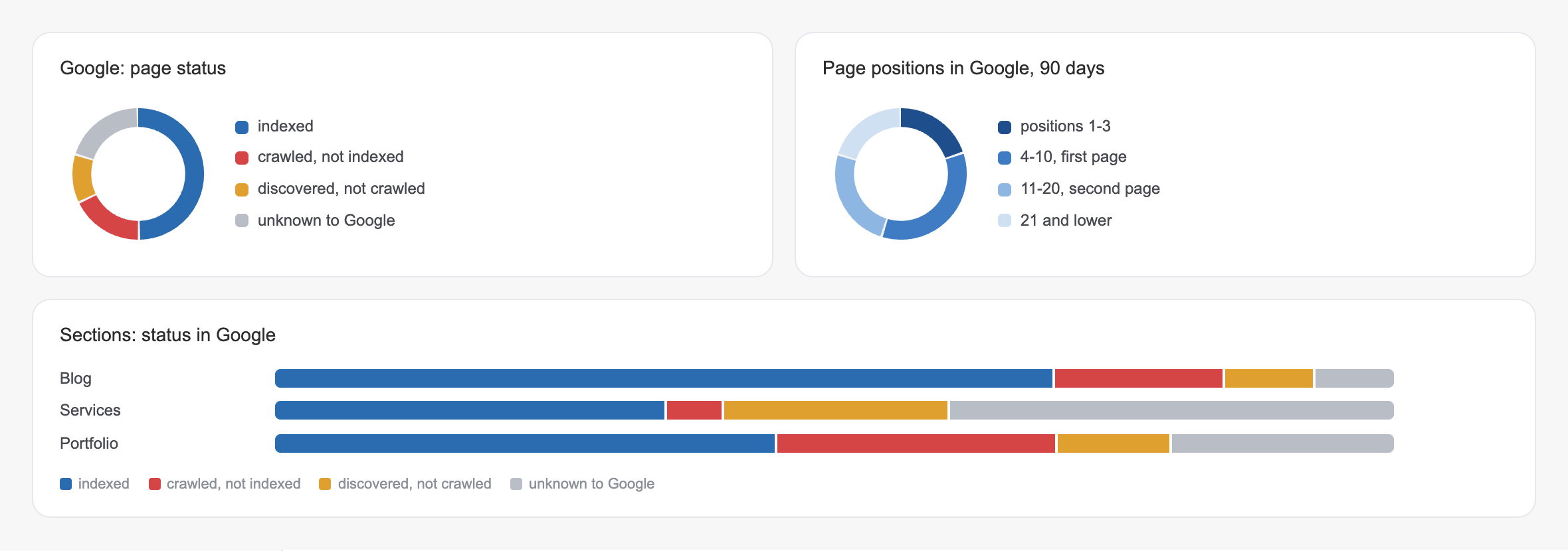
The first full run sorted the addresses we want in Google (live, canonical and listed in the sitemap) into four states. Under half were indexed. A noticeable part had been crawled and left out, a smaller part was discovered and waiting, and a large share had no record in Google at all, despite the sitemap.
| Google's state | What it means for you |
|---|---|
| Indexed | In the index and eligible to appear in results |
| Crawled, not indexed | Google fetched the page but has not included it in the index. It does not say why (a duplicate, another canonical, too little value), so each case needs a closer look |
| Discovered, not crawled | Google knows the address and has not fetched it yet: a question of priority |
| Unknown to Google | No record of the address at all: a question of paths |
The four states call for different work. An unknown page needs a path that leads to it, a discovered page needs a reason to come first, and a crawled page needs a closer look at why it was left out. A single total mixes all three problems into one number.
Money pages
Where the offer was
Then we filtered by service pages, and the picture became uncomfortable. In some of our languages most service pages had never been recorded by Google. All of them were in the sitemap and linked from the menu, the footer and the services list on every page. Technically there was nothing wrong with them.
Our best explanation is a hypothesis rather than a measurement. Menu and footer links point to every page equally, so they tell Google little about which page matters. The links that carry weight sit inside texts, and almost all of ours led from one article to another. Google followed those paths into the blog, where we publish most often, and the commercial pages waited in the queue. To test this, we added links to the service pages from inside articles Google already shows (more in the chapter on actions) and changed nothing else on those pages, so the next runs can confirm or reject the idea.
Following the guide, we let Google choose the order. It chose the blog.
For a business this matters more than any missing article. An article brings a reader, and a service page is where that reader becomes an inquiry. In those languages people could find our articles but no page to hire us from.
A total of indexed pages can look healthy while none of them sell.
Own site
Finished, but not quite
We expected the first run on our own site to confirm what we already knew. Several things we considered finished, some of them long ago and done carefully, turned out to need work. Each one came with its own evidence and its own decision:
| Finding | Evidence | Decision |
|---|---|---|
| Author tabs copied the author page | The crawl: tabs by blog section with the same title and description as the author page and almost no text of their own | Each tab now names the author page as its canonical |
| A renamed case was still shown in search | Search data showed impressions on the old address, and the crawl found it returned "not found" | A permanent redirect to the new address |
| Image-only cases | Inspection: case pages with only a gallery and a heading were rarely indexed, and cases with a written story several times more often | A written story for those cases, one by one |
| Translations | Inspection: articles translated faithfully were indexed clearly less often than the same articles in their original language | Rewriting such texts for the market of each language, with local context and examples |
| Older articles | Inspection: articles from our earlier months were indexed less often than recent ones | None yet: our editorial process changed between those periods, and we claim no more than the correlation |
The case pages surprised us most. They looked complete to us and to clients, because a designer reads a gallery as a story, while a search engine sees an empty page with pictures.
None of this showed in the aggregate report. Each item became obvious once one address stood next to another in a register.
Actions
What we changed
A report is only worth the decisions it produces. The audit gave us a short list, most of it done in the same week:
- Requests by hand, in order: the pages that matter most to the business go to Google's "Request indexing" first, in small batches each day.
- Links from inside texts: articles Google already shows in search now lead to the service pages, through words that were already in their text, so a page Google visits points to one it has not seen.
- Fixes from the crawl: the canonicals, the redirect and the list of cases that need a written story.
- Translations rewritten for the market of each language.
Bing and several other engines also get changed pages through IndexNow, a protocol they accept. Google does not use it, which is one more reason its queue needs an order of its own. The next weekly runs will show which of these changes moved, and that is the point of a register with dates: every change becomes an experiment you can read.
Console
One click to request
The audit started as a set of tables. Within a day it became a section of our admin panel, because a table tells you what is wrong and a tool should tell you what to do next.
The console opens with a dashboard: index states, positions, pages by section and language, AI crawler visits and search queries with their changes. Every part of every chart is a link. Click a segment and you get the list of pages behind it; click a query and you see which of your pages Google shows for it.
The most useful part is the simplest. An indexing queue lists the pages Google has not indexed, ranked by what matters to the business, with the pages that sell at the top. Next to each page is one button that opens that exact address in Search Console's URL Inspection, where "Request indexing" is one more click, and marks the page as sent with the date. A counter shows how many went today. Google does not publish the daily limit for these requests; in our experience it is about ten for one property. After the next weekly run, the sent pages show their new state.
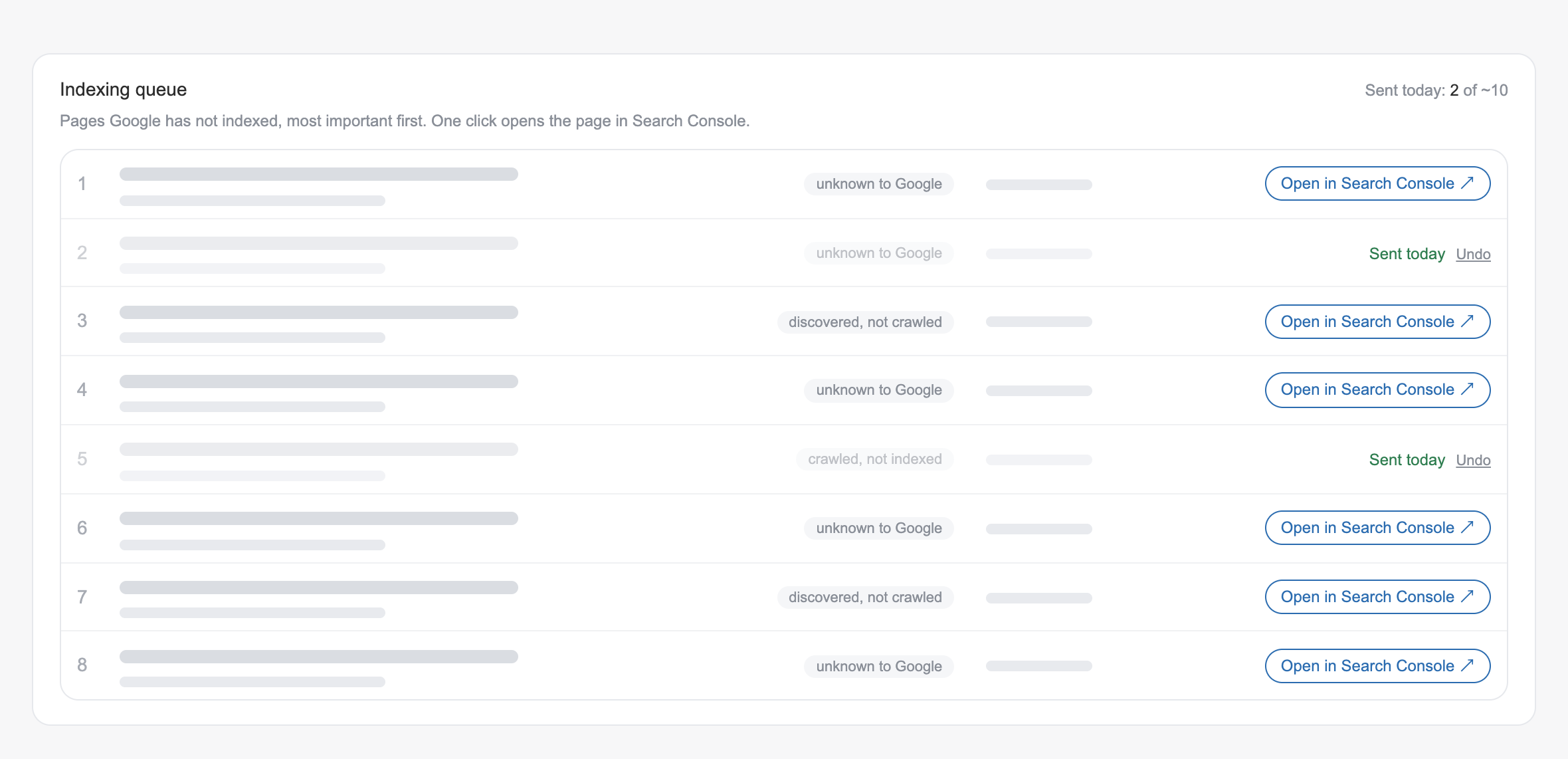
What used to be a list in someone's notes and a guess about what to send first is now a queue that orders itself.
How to repeat
Set it up yourself
You do not need our console to run the same audit. The Google side takes about twenty minutes of clicking, and the rest is a script that an AI agent can write with you from a clear brief. The setup:
- A Google Cloud project with the Search Console API enabled in its API library. The API is free within its quotas, and this one API covers search data, URL Inspection and sitemaps.
- A service account in that project, a robot user with a JSON key. Keep the key on your server, outside the website folder and out of any repository or chat: the agent works with the path to the file, never with its contents.
- Access in Search Console: under Settings, Users and permissions, add the service account's email address with Restricted permission, and let the script ask Google only for the read-only scope.
- The exact property name: sc-domain:example.com for a domain property, or https://example.com/ with the trailing slash for a URL-prefix one. Most "permission denied" errors come from this detail.
- Bing, if you want it: Bing Webmaster Tools gives an API key in its settings, and several AI assistants, Microsoft Copilot among them, draw on Bing's index.
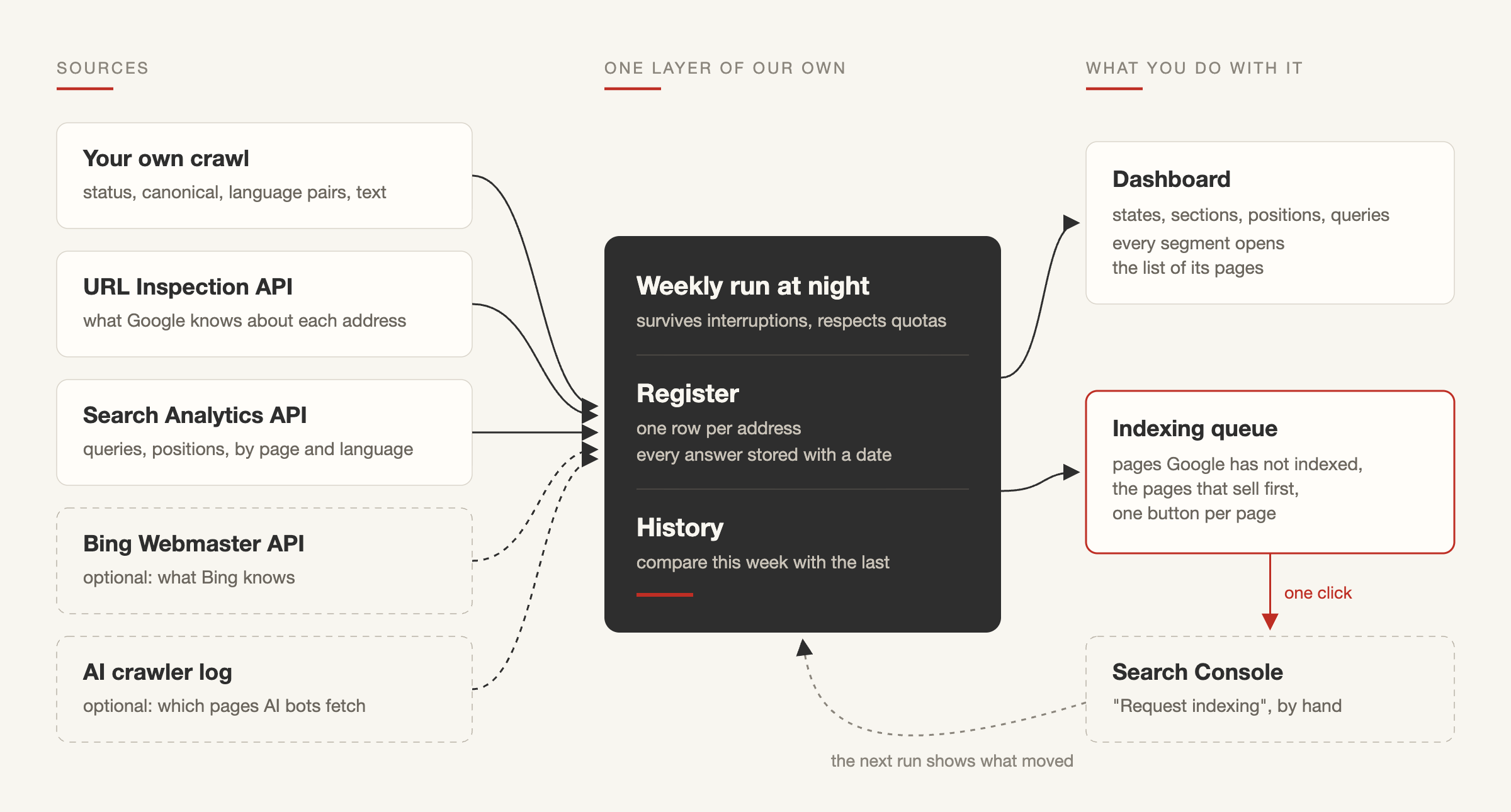
Our brief to the agent was the one we would give a developer. For every address from the sitemap and from internal links, record what the page serves, ask Google what it knows, take the search data, store every answer with a date, survive interruptions and never print a key. The script now runs every week at night, and each of its sources answers a different question:
| Source | What it tells you | What it cannot tell you |
|---|---|---|
| URL Inspection API | What Google last knew about the address: indexed, crawled, discovered or unknown, the last crawl, the canonical Google chose | The live state of the index this minute |
| Search Analytics API | Whether the page appeared in results, for which queries and at what position | Whether a page with no impressions is indexed |
| Your own crawl | What the page really serves: status, canonical, language pairs, title and amount of text | Anything about Google's index |
A few details save time (Google's documentation, November 2026). The URL Inspection API allows 2,000 checks a day per property, and each answer carries a link to the same check in the Search Console interface, which is what makes a one-click queue possible. The Search Analytics API returns up to 25,000 rows per request where the interface stops at 1,000, can filter pages by a regular expression (one series per language folder, for example) and keeps about sixteen months of data with a delay of two or three days.
Two details cost us time, and both were about data rather than code. Our first script kept retrying after the daily inspection limit; the current one stops cleanly and keeps the last known answer, marked as such. And the first Bing results said a large share of our pages were missing from Bing. The raw answers showed that most of them meant "too many requests", since in our runs Bing answered only a few checks a minute for one site, so a throttled answer is now never counted as a result.
One step stays manual. "Request indexing" exists only in the Search Console interface, and Google says its Indexing API is only for job postings and livestream pages. A tool can bring you to the button; pressing it stays with you.
AI crawlers
Other readers
Google is no longer the only reader that matters, so the site also keeps a log of AI crawlers: one line for each visit of a known crawler, with the time, the address and the status. There is no IP address and nothing about people, and nothing of it is visible on the pages.
The method has limits worth stating. A crawler is recognised by its user agent, which is what a request says about itself and can be faked; since the log keeps no IP addresses on purpose, we do not check requests against the address ranges the AI companies publish. And a fetch is only a fetch: it does not mean the page will be cited in an answer from ChatGPT, Perplexity or anyone else.
With those limits, the first hours of the log were still telling. Requests signed by several AI companies fetched our pages in all three languages, and more than half of what they read was not in Google's index. A few hours make a sample rather than a study, but it shows that the two lists differ: a slow Google index does not mean AI assistants cannot read you. We wrote about that shift in SEO, AEO and GEO in 2026.
Lessons
What owners can take
The lessons hold for any site, with or without a console:
- Ask what Google knows about each address, at least for the pages that sell, before trusting a total.
- Treat discovered, crawled and indexed as three different problems with three different fixes.
- Check commercial pages on their own, because a healthy blog can hide an invisible offer.
- Compare the index state with whether a page actually appears for real queries.
- Look at each language as its own site with its own market.
From the build itself: read raw answers before you trust a summary, and test a tool on your own site first, because the pages we were surest about were the ones that needed work.
Most of the talk about AI in marketing is about writing more text faster. For a small company the bigger change is that the instruments to see your own business can now be built from a clear question in an afternoon. The method, the reading of the data and the decisions were ours; AI made building the instrument cheap.
Search Console stays the main source, and every number in our register comes from Google's own APIs. What we added is a layer that keeps history, puts the sources side by side, orders the work and does not freeze when a report does. With organic search changing as fast as it is, which we looked at in Organic Search Is Shrinking and Ads Cost a Fortune, that layer is worth having.
FAQ
Questions about indexing audits
What is the difference between "Discovered" and "Crawled, currently not indexed"?
"Discovered, currently not indexed" means Google knows the address but has not fetched it yet, usually a question of priority. "Crawled, currently not indexed" means Google fetched the page and has not included it for now. Google does not give the exact reason: it can be a duplicate, a different canonical chosen by Google, thin content or a weak signal of importance, so each such page needs a closer look.
Can I check the index status of every page without writing code?
For a handful of pages, yes: paste each address into URL Inspection in Search Console. For hundreds of pages you need the URL Inspection API, which allows 2,000 checks a day per property. That is where a script, or an AI agent writing one with you, becomes the practical route.
Is it safe to give an AI agent access to Search Console?
Give it as little as the job needs. A service account with Restricted permission and the read-only scope cannot change anything in your account, and the key file should stay on your server: the agent works with the path to it, never with its contents.
Can "Request indexing" be automated?
Not for ordinary pages. The button exists only in the Search Console interface, and Google says its Indexing API is only for job postings and livestream pages. What can be automated is everything around the button: choosing the pages, ordering them and opening the right check in one click.
Does "Request indexing" in Search Console really help?
It asks Google to crawl the address soon. Google does not publish the daily limit; in our experience it is small, about ten requests for one property. It does not guarantee indexing, and it works best for important pages Google has not found yet, sent in an order you choose.
Why does the sum of my queries not match the sum of my pages?
Totals by page include searches that Google hides for privacy reasons, while totals by query leave them out. On pages with broad traffic a large share of impressions can sit in that hidden part.
How often should an indexing audit run?
Weekly is enough for most business sites. The value comes from comparing runs: which pages left "unknown", which fell out of the index after a change and which requests worked.
Sources
- Google: URL Inspection API, UrlInspectionResult
- Google: Search Analytics API, query
- Google: Search Console API usage limits
- Google Search Console Help: Page indexing report
- Google Search Central: Ask Google to recrawl your URLs
Not sure which of your pages Google has actually seen? Let's check what it knows about each one.
- Share
-

-

-

-

One notification a week with the new PERETZ articles. Nothing else.