Baby Rabby, stage three: how we prepare an online store for launch



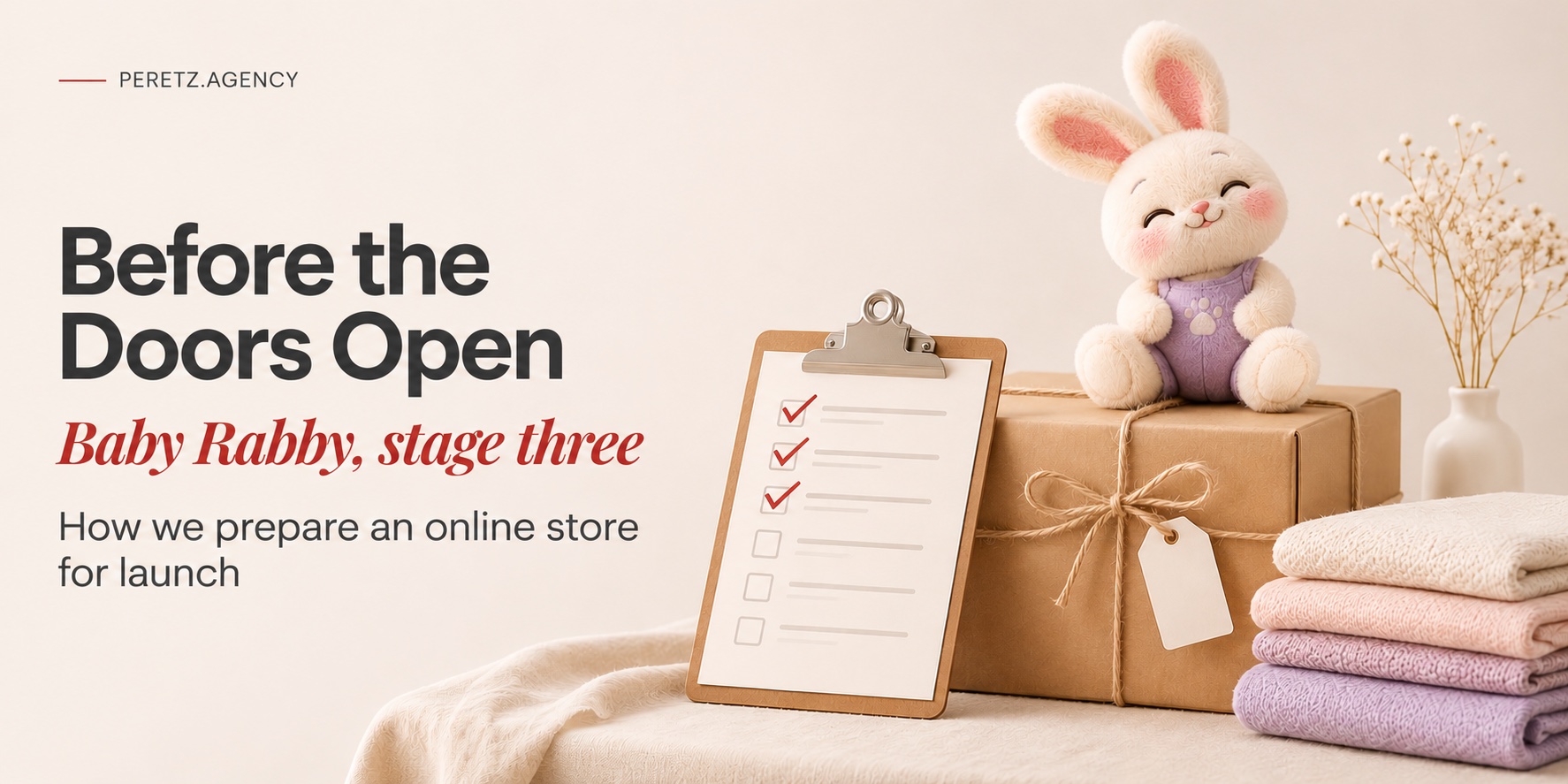
Baby Rabby is our own store for mums and children. After the identity, the prototype and the Laravel store came the part case studies usually skip: everything around the code that has to be done for a store to open and run every day. This case study is about how we organised the launch: where the tasks live, how the money is counted, where the goods come from and why the store has a community before its first sale.
Baby Rabby sells clothing, textiles, sleep things, toys and products for mums, from pregnancy until the child turns seven, in Ukraine. Stage one, the mark and the prototype, is in the Baby Rabby portfolio case. Stage two, how the prototype became a store with a parents' cabinet, an admin, purchasing and a warehouse, is in Baby Rabby, stage two.
Good code is not yet an open store. Between the two sit a bank account and receipts, the terms of sale, suppliers, packaging, Nova Poshta deliveries, texts, promotion, and the money all of this takes before the first order. In most projects that work lives in messengers and in a few people's memory. We moved it to where the store itself lives.
THE LAUNCH AS A PROJECT
The launch as a project of its own
We run development as tasks, with tests and a change log. A launch is usually run differently: someone remembers the bank account, someone promised to write to a supplier, and the packaging agreement stayed in a voice message. With two people and ten things to do, that works. With twenty things, half of them waiting on someone outside, a lost item turns up on the day you can no longer sell without it.
So we treated the launch as a project with the same rules as the code:
- every item has an owner, a state and, where it matters, a date;
- the result is written under the item rather than retold in a chat;
- the discussion sits next to the item rather than in a separate thread;
- costs are recorded when the money leaves, with a category and who paid.
All of it went into its own section of the store admin, Launch. No separate task tool was needed: the team opens the admin every day anyway, so the launch work sits where they already look.
THE LAUNCH ROOM
A checklist that does not get lost
The launch checklist has five sections: sole proprietor registration, money and documents; suppliers and goods; promotion; site and launch; other. It holds twenty items, from choosing the tax group and receipts for payments to a test order from start to finish and opening the store to search.
Every item is in one of four states: to do, in progress, waiting, done. We added "waiting" on purpose: it marks items held up by a bank, a supplier or a print shop rather than by us. Without it, such items look forgotten.
A finished item is never closed in silence. The result is written under it: what was decided, who agreed to what, where the document is. In a month nobody will remember why this bank was chosen, and the note under the item will. Each item also has its own discussion, so "have you talked to the wholesalers yet?" is asked where the task and the whole conversation are both in view.
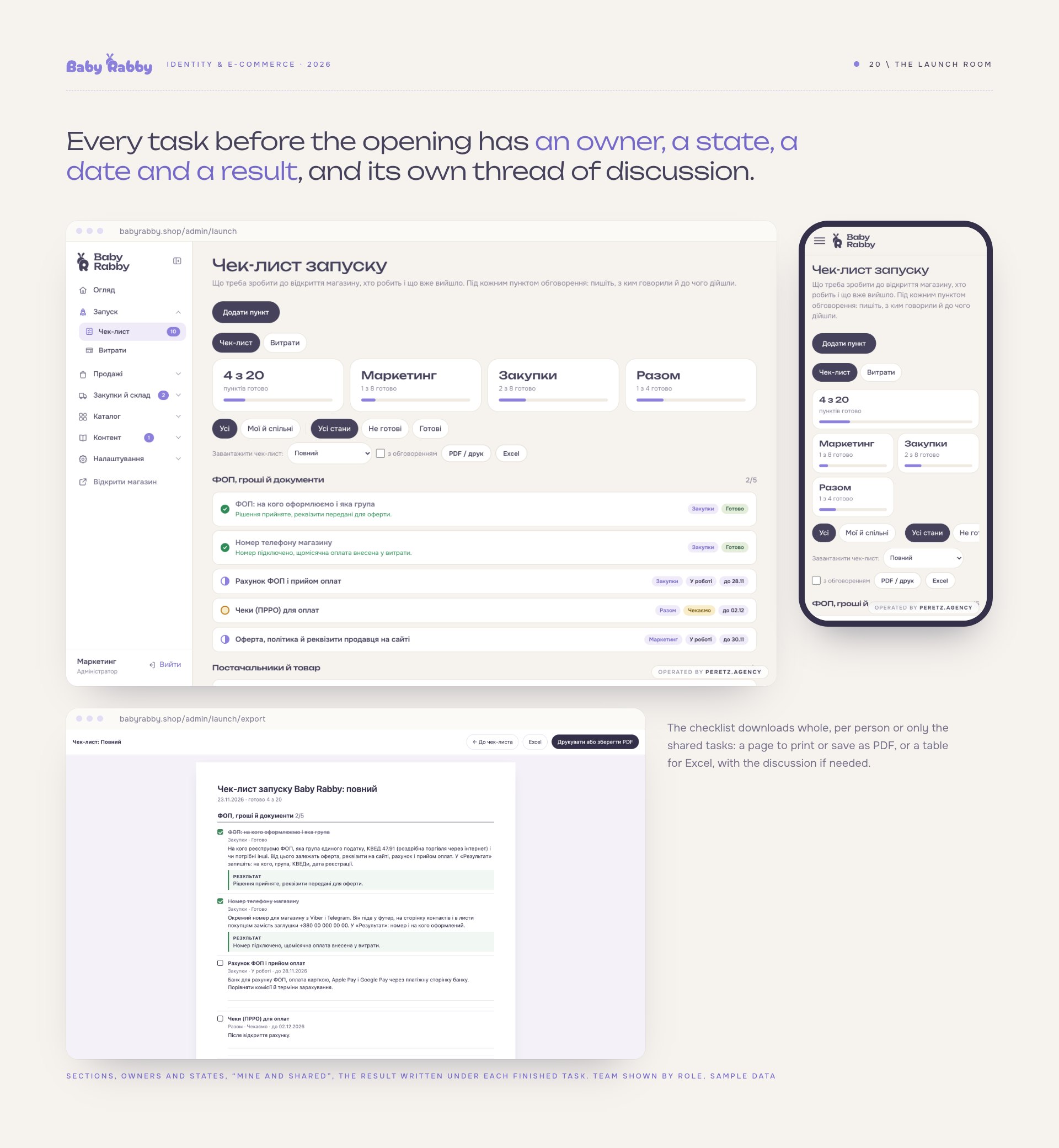
Everyone sees their own items and the shared ones in one filter, and a counter in the admin menu shows how many open items are waiting on them. The checklist downloads in full, for one person or only the shared items: as a page to print or save as PDF, or as a table for Excel, with or without the discussion. That is for meetings where paper in hand works better than a screen.
A finished task with no written result becomes a question again in a month.
MONEY BEFORE THE FIRST SALE
Money before the first sale
A launch costs money long before the first revenue: domain and hosting, a phone number, product samples for photos, a trial print of inserts and stickers, trips to manufacturers, sample deliveries, services. Each sum is small on its own, so they rarely get written down. Then nobody can say what the launch really cost, and the first year's unit cost is a guess.
In the Expenses section every cost has a date, a category, an amount and who paid. Anyone on the team can pay, or the store's own till. The admin shows the total and this month's sum, a subtotal for everyone who paid, a table by month and a breakdown by category.
Monthly payments work separately. A cost marked "monthly" reappears at the top the next month as "to pay". The Paid button records it for the current month with the same name and category, and "We no longer pay" stops the reminders. That way the phone, mail and subscriptions neither drop out of the record nor get paid twice.
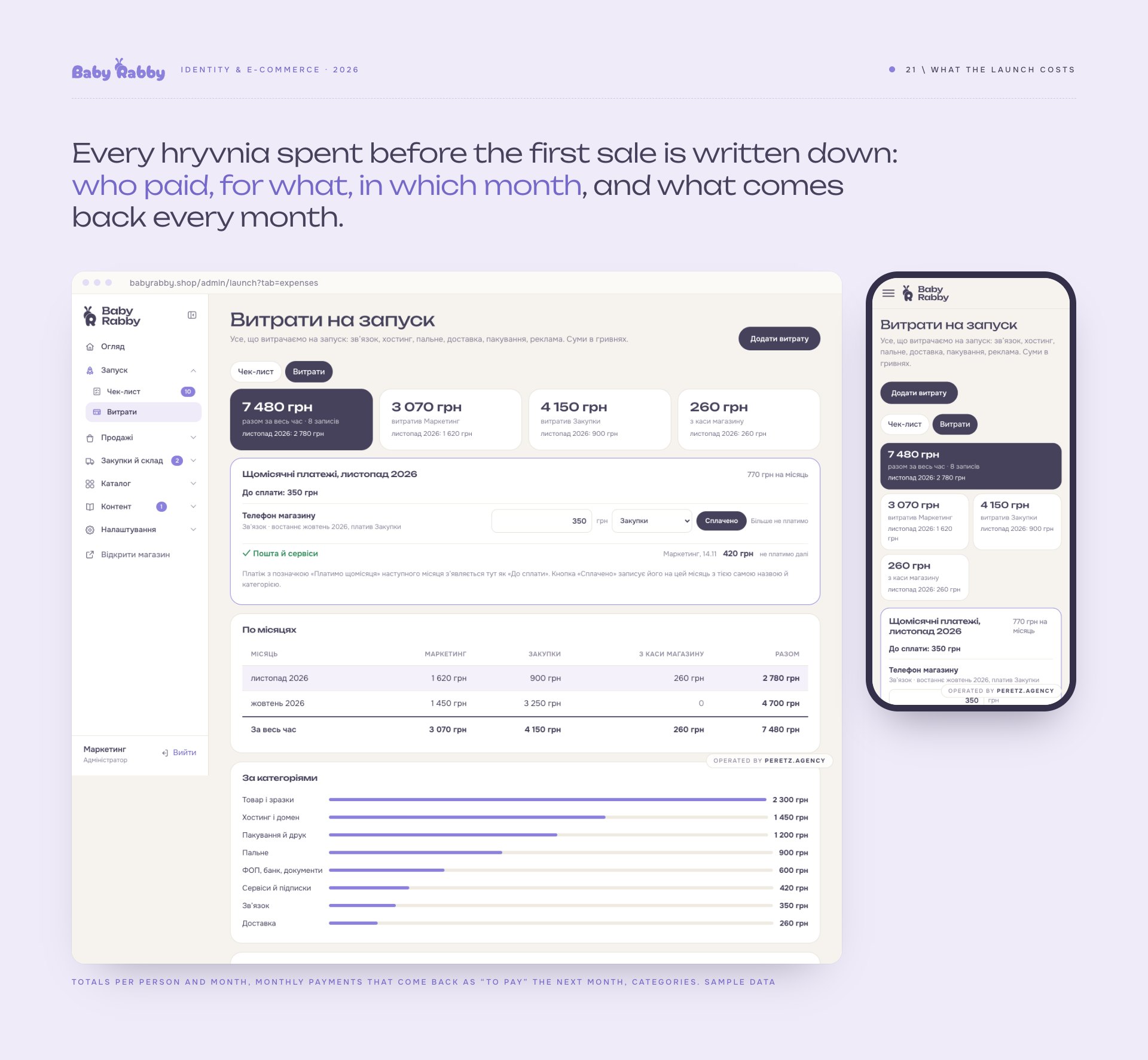
These figures then feed the marketing budget and the prices. How we plan the first year's budget is in our article on the online store marketing budget.
SUPPLIERS
Suppliers without buying stock
A store for mums and children up to seven needs a wide range: dozens of models in every size and colour. Buying all of it up front freezes money in stock before anyone knows what sells. Some items we sew ourselves; the rest comes from vetted manufacturers and wholesalers on a dropshipping model.
To the customer, every parcel is a parcel from Baby Rabby, whoever ships it. The supplier keeps the goods in their own warehouse. When an order comes in, we confirm it and send the supplier the parcel contents together with a ready Nova Poshta waybill that names Baby Rabby as the sender. The item travels neatly folded in a bag, with our insert inside and our sticker outside. The supplier's invoices, prices and advertising never go into the parcel. The customer pays us, and once a week the supplier is paid for the orders customers received, with a report: order number, item and size, drop price, waybill number and delivery date.
For suppliers we built a separate page on its own subdomain: how it works in five steps, what is and is not in the parcel, how we pay, whom we are looking for and what we do not take. It carries a request form with product categories, a link to the price list and the warehouse city. Requests arrive in the admin and in the store's mailbox, and the agreements themselves are tracked in checklist items.
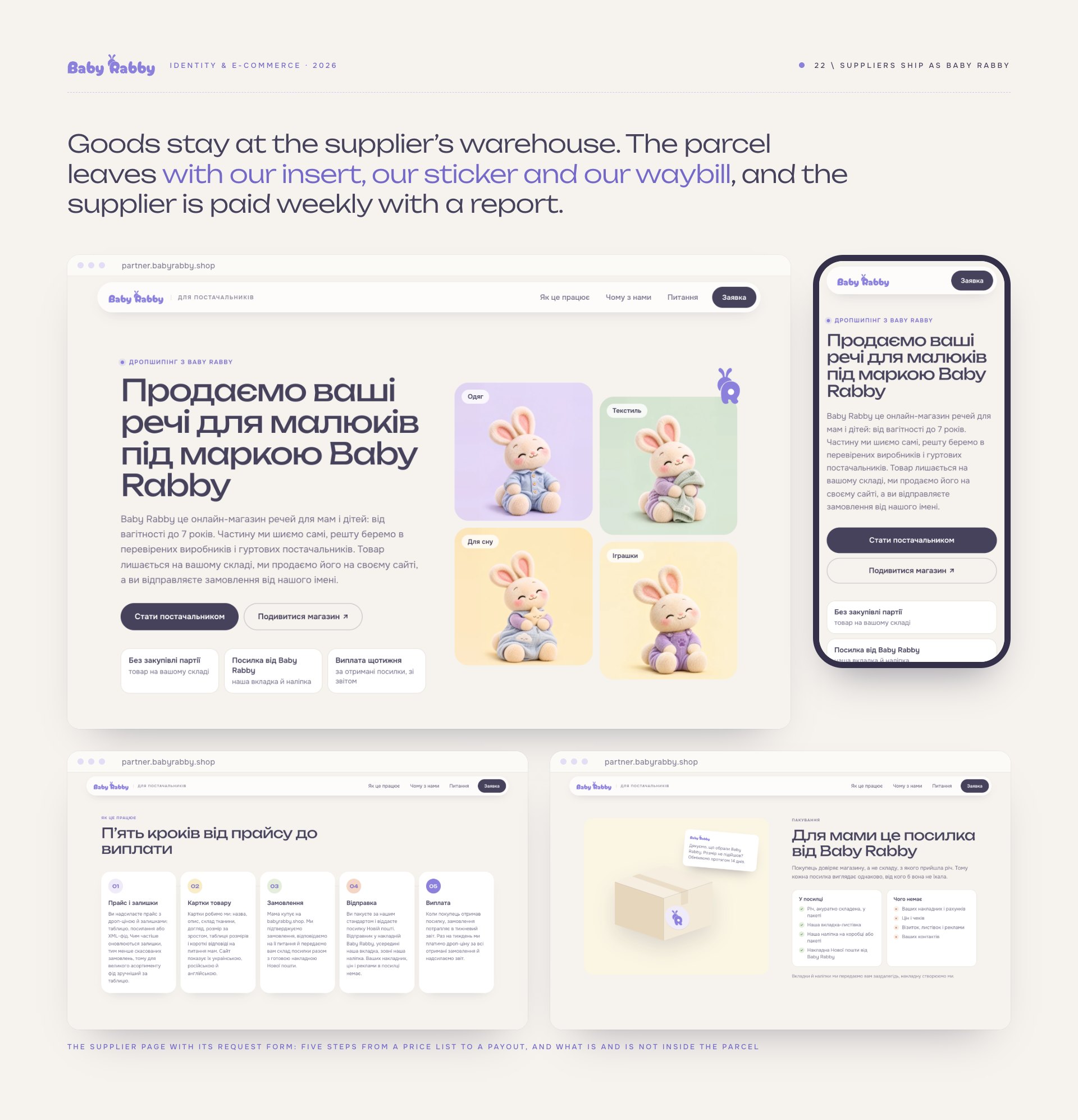
This model sits between a marketplace and your own warehouse. How the two differ and where to start is covered in marketplace or your own online store.
THE RANGE
A wider circle without losing focus
Baby Rabby started as a store for babies up to two. During the preparation we widened it: from pregnancy until the child turns seven. Parents keep buying after a child's second birthday, and a store that lets them go at that age loses a customer it already knows. The supplier network lets the range grow without growing the warehouse.
Widening the positioning changes more than it seems. It has to run through the store description, meta tags and category texts, the section for expecting mums, the supplier page, the blog and the glossary, and the parents' cabinet that works out sizes from the child's height. We ran it as its own checklist item with a list of places, not as an edit to one sentence on the home page.
COMMUNITY
A place people come back to
People buying for young children have questions a catalogue cannot answer: how other births went, what was actually needed in the hospital bag, how a child settled into kindergarten. So before the store opens it already has two sections written by parents.
Mums' Stories is a blog section where mums tell how it went for them and ask questions. Dads can read what a mum goes through and see how to help. We read every story before it goes up, and we answer the questions ourselves. Each story has a discussion and a share button: the system share sheet on a phone, Telegram, Viber, Facebook, WhatsApp or a copied link on a computer. A story about health carries a note that we are not doctors and that in an emergency the number to call is 103 or 112.
From Mums is a board where mums sell and give away things their child has outgrown. We do not sell these things or take a commission; we only check every listing before it is published. Some things are banned from the board for good: car seats and infant carriers, because damage after a crash cannot be seen; mattresses, bumpers, positioners and sleep pillows, because a baby needs a flat, firm mattress to sleep safely, ideally a new one; bottles, teats and dummies; broken or faulty items. We advise buyers to pay on collection at the Nova Poshta branch and never to send prepayment to strangers.
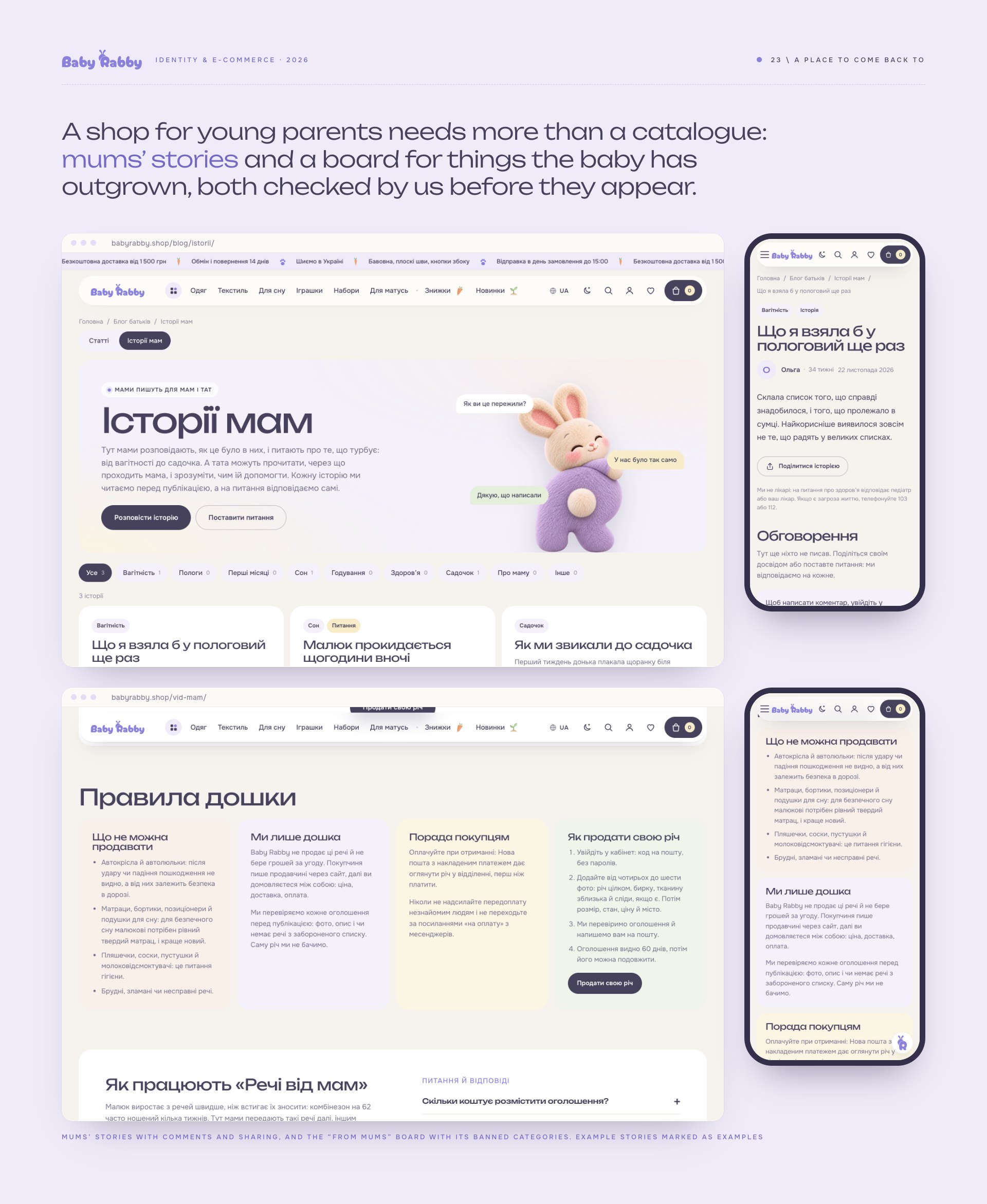
A community can arrive before the first customer, not after the hundredth order.
SEARCH BEFORE OPENING
What search engines see before the opening
While the products are still drawings, the store itself is closed to search engines. What is already real is open: the parents' blog with its sources, the glossary, Mums' Stories, the From Mums board and the supplier page. Every open page goes to search engines through IndexNow as soon as it is published or changed, and the sitemap lists only open addresses. Pages with personal data, such as a seller's own listings on the board, stay closed even inside an open section.
This order gives the blog and the community time to earn search engines' trust before the product pages open. Opening the whole store takes one line in the settings, once the pages carry real photographs.
WHERE WE ARE
Where the store is now
Baby Rabby is preparing for an active launch, and new features are connected every day. What is done on the checklist is visible in the admin, and everything left has an owner and a state.
The documents and pages a store cannot sell without are collected in our online store launch checklist. How the store itself is built, from the prototype to the warehouse, is in Baby Rabby, stage two.
FOR YOUR LAUNCH
What to take for your own launch
You do not need your own admin to use this approach. What we would keep for any store before it opens:
- Run the launch as a project: every item with an owner, a state and a written result.
- A separate state for items waiting on someone outside, so they do not look forgotten.
- Record every cost from day one, with who paid and which payments repeat monthly.
- Check whether you need your own stock when suppliers can ship under your brand.
- Build the community before the opening, with moderation and clear safety rules.
- Open to search only what is already real.
A store opens when the launch is ready, not only the code.
This is how we prepare client stores for launch too. If you are planning one, our e-commerce development page explains how we work and what it costs.
What came next, when dozens of shops and thousands of goods wanted in and the store grew into a marketplace, is in Baby Rabby, stage four.
FAQ
Frequently asked questions
What needs preparing for an online store launch besides the website?
Documents and payments (registration, a bank account, receipts, terms of sale with seller details), suppliers and packaging, delivery, texts and a promotion plan, and a test order from start to finish. For Baby Rabby that is twenty items in five sections, each with an owner, a state and a written result.
Where should a store launch checklist live?
Wherever the team already looks every day. We built a Launch section into the store admin, with states, dates, a discussion under each item and export to PDF or Excel. For a smaller project a shared spreadsheet is enough, as long as it has an owner, a state and a result for every item.
How should launch costs be tracked?
Record every cost when it is paid: date, category, amount and who paid. Mark monthly payments separately so they come back as a reminder the next month and do not get lost. Without this, the first year's unit cost is a guess.
How does dropshipping under the store's own brand work?
The supplier keeps the goods and, after an order, ships them in neutral packaging with the store's insert and sticker and a waybill that names the store as the sender. The customer pays the store, and the supplier receives the drop price for delivered orders once a week with a report.
Is it worth building a community before the store opens?
Yes, with moderation and rules. Parents' stories and questions give people a reason to come back and give search engines real content before the product pages open. At Baby Rabby every story and listing is checked, and items that are unsafe to buy second-hand are banned.
Sources
- HealthyChildren.org (AAP): a parent's guide to safe sleep
- Google Search Central: SEO for e-commerce sites
- Google Search Central: block search indexing with noindex
- IndexNow: how it works
Preparing a store for launch and want nothing lost between the code, the money and the suppliers? Let's look at your plan.
- Share
-

-

-

-

One notification a week with the new PERETZ articles. Nothing else.
Related Reading
-
22. 11. 2026
Baby Rabby, Stage Two: From a Prototype to an Online Store Built to Grow

-
21. 11. 2026
How to Launch an Online Store in the USA: Company, Sales Tax, Product Safety and Required Pages (2026)
-
21. 11. 2026

Online Store Marketing Budget: How Much to Spend in the First Year (2026)
-
21. 11. 2026

Amazon or Your Own Online Store: Which to Start With in the US (2026)
-
24. 11. 2026

Baby Rabby, stage four: how an online store grows into a marketplace