Schoeffel Investors Section: Why We Built Its Admin on Node.js, Not Laravel





A research section for investors, an admin with zero packages, and an honest look at what Node.js is good at
When we wrote about the first Schoeffel landing page, we called it Phase 01, a digital foundation. That landing page is now becoming a site. Schoeffel has a new section for investors, and the House's own team runs it through an admin we built on Node.js.
Laravel is our main backend, and we have written about it many times. This time we chose something else, and this article explains why: what the section is for, how the admin works, what Node.js is genuinely good at, and the one weakness we would never hide from a client.
WHY INVESTORS
A House that is being reborn
Schoeffel was founded in Germany in 1921. In When a Brand Disappears, Is It Really Dead? we asked whether a heritage name can come back. The answer the House is giving goes further than a revival. Schoeffel is being reborn as a brand with real weight, and a serious e-commerce platform is already in development for it.
A business at that stage talks to investors, and investors ask for evidence. The new section gathers the independent research behind the House's view of the pearl market in one place: summaries of reports by McKinsey and The Business of Fashion, BCG and Altagamma, UBS, CIBJO and GIA, plus a main market overview with its key findings shown beside it.
The page is built for reading and for passing on. Filters split the documents into Market & Clients and Pearls, each filter has its own link, and one button downloads everything. Each document opens or downloads as a PDF, and every such action can be counted in analytics.
A House being reborn needs a place where its evidence lives.
The section lives on the landing page's own design. We added no new visual styles: the same deep navy, the same header that hides on scroll, the same footer from the home page. For a brand of this age, consistency is part of the message.
THE BRIEF
What the admin had to do
The brief was short. The Schoeffel team must be able to change the section at any time without calling us. In practice that meant five abilities:
- add, edit, remove and reorder documents, with their PDFs;
- replace the main report, its cover and its key findings;
- change every text on the page, including the filter descriptions;
- see the result in a preview before anyone else does;
- bring back any earlier version if something goes wrong.
There were also two conditions that shaped the technology more than any feature did. The Schoeffel site is a static PHP site on ordinary shared hosting with cPanel, outside our servers, and we do not run it. And the public page had to keep working even if the admin stopped.
WHY NOT LARAVEL
Why we did not reach for Laravel
For most business systems we choose Laravel without a second thought: CRMs, client portals, stores, booking systems, anything with roles, documents and a heavy admin side. Our Laravel development work and the comparison in Laravel, Node.js or Python for a business app explain why.
Here the scale was different. A Laravel admin would have brought a whole second application to a site that is not a Laravel site: Composer, a vendor folder with thousands of files, a database, and a framework version to upgrade every year. All of that to manage eight documents and a few dozen lines of text.
| What the job needed | Laravel | Node.js, as we built it |
|---|---|---|
| Install on shared hosting | Composer, vendor folder, database | One folder, one start file |
| Data storage | A database and migrations | JSON files on disk |
| Outside packages | Dozens, through the framework | None |
| Yearly upkeep | Framework and PHP upgrades | A Node.js LTS line every two years or so |
| If the admin stops | The admin is down | The page stays as published |
None of this makes Laravel worse. It makes it the wrong size for this job. When a client needs a real system, the conventions of a framework save months. When the client needs a small, sharp tool next to a site that already exists, the framework is mostly weight.
WHY NODE.JS
What Node.js does best
Node.js runs JavaScript on the server. Its own documentation describes it as an asynchronous, event-driven runtime: instead of giving each visitor a thread of their own, one process handles many connections at once and switches between them while each one waits for a database, a file or the network.
From our own work, we would describe its strengths like this.
Real time. Node.js is at its best when the server keeps many connections open and pushes events to them: live dashboards, chats, notifications, collaborative screens. This is the job it was designed for.
Speed and concurrency. Because the process does not sit idle while waiting, a modest server can hold a high number of simultaneous connections. For products with many small requests, that is a real saving in hardware and in latency.
One language across the whole product. On one relatively large project of ours, the team works in essentially one language: JavaScript, and TypeScript across the full stack, with React, Vue or Angular on the front end. Types and validation rules are shared between the browser and the server, and a developer can move between the two sides without switching heads. When we hire Node.js developers for a product like that, this is the main argument.
Lightness. A Node.js app can be a single process with a single start file. For the Schoeffel admin this was the deciding quality: it had to sit next to someone else's site and ask nothing of it.
Node.js gives you bricks. The house plan is yours to draw.
ZERO PACKAGES
An admin with no dependencies
The admin is about 940 lines of our own JavaScript, and its package.json has no dependencies at all. Nothing is downloaded at install time, so nothing can go out of date, disappear from the registry or arrive with a compromised update.
Everything it needs is already inside Node.js: the HTTP server, the file system, cryptography and streams. Even uploaded PDFs are read without a library, because Node.js now carries the same web standard Request and FormData that browsers use:
async function form(req) {
  const r = new Request('http://local' + req.url, {
    method: 'POST', headers: req.headers,
    body: Readable.toWeb(req), duplex: 'half' });
  return await r.formData();
}
Data lives in two JSON files: a draft that the admin edits and the published version that the live page was built from. There is no database to create, back up or migrate. It runs on Node.js 20 or newer; Node.js 20 itself left support in April 2026, so on a new install we choose a current long-term support line, 22 or 24, whichever the hosting offers.
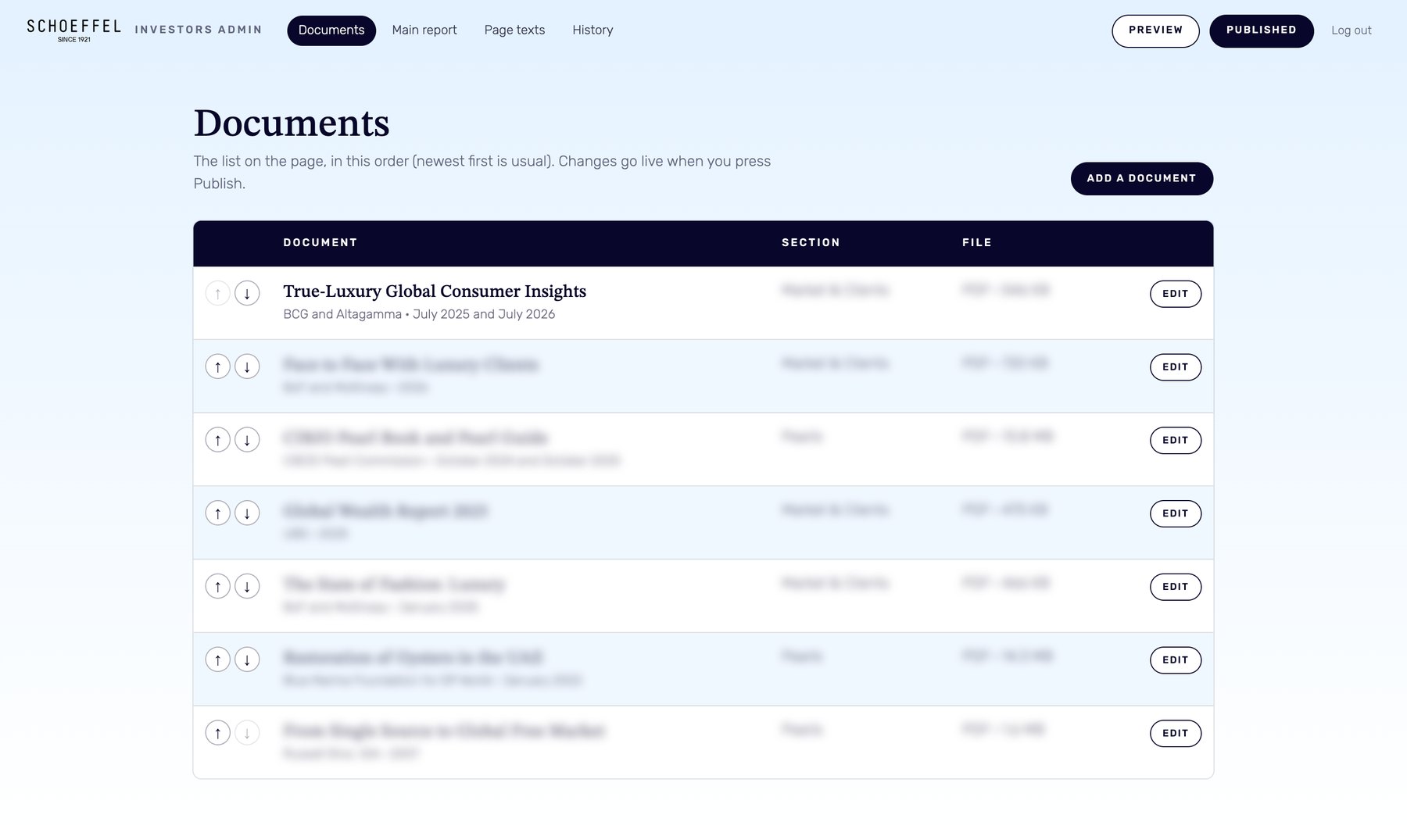
The admin looks like part of the House. Its colours come from the Heritage block of the home page, light blue into white with navy headings, and its buttons repeat the buttons of the landing page. The people who edit the section see Schoeffel, not a generic control panel.
PUBLISH
A page that does not need the admin
The most important decision is invisible. When the team presses Publish, the admin writes a finished static page into the site. Visitors never touch the Node.js app. If the app stops, restarts or is switched off for a month, the page stays exactly as it was last published.
Writing that page safely took one small pattern. The new page is written to a temporary file first and then renamed over the old one, so a visitor can never open a half-written page:
function writeAtomic(file, content) {
  const tmp = file + '.tmp-' + process.pid + '-' + Date.now();
  fs.writeFileSync(tmp, content);
  fs.renameSync(tmp, file);
}
Every publish also keeps a copy of the data and of the page itself. The admin shows the last 30 versions, and Bring back loads any of them into the draft. Preview shows the draft before it goes live. Together they make the admin forgiving, which matters more to a busy team than any feature list.
The public page must never depend on the admin that writes it.
SAFETY
Safety without a framework
A framework gives you a login, sessions and form protection out of the box. Without one, each of these has to be written and checked by hand. We wrote them with what Node.js provides:
- the password is stored only as a scrypt hash and compared in constant time;
- the session cookie lives 12 hours and is HttpOnly and SameSite=Strict;
- every form that changes something carries its own token;
- after 8 wrong passwords in 15 minutes from one address, login stops answering.
Uploads are checked by content, not by name: a file is accepted as a PDF only if its first bytes say so, and its name is cleaned before it touches the disk. Every text from the admin is escaped when the page is built, so no HTML or script can reach the public site through it. The admin pages tell search engines not to index them, and the app with its data sits outside the public folder of the site.
THE TRADE-OFF
The one real weakness: the team lead
If we had to name one problem of Node.js, it would be the team lead. Node.js is a runtime, and it hands you very few decisions ready-made. Laravel arrives with a structure: where routes live, how the database is reached, how forms are validated, how jobs are queued. In Node.js the architecture has to be assembled, and a lot has to be written by the team itself.
That freedom is exactly why the Schoeffel admin could be so small. It is also why two Node.js projects can share almost nothing, and why a new developer first has to learn how yours is organised. On a large product the quality of the result depends on one person: the lead who chooses the structure, writes it down and keeps everyone inside it. With a strong lead, Node.js is fast and pleasant. Without one, it grows into a tangle that nobody wants to touch.
For a tool of 940 lines the structure fits in one head and in one README. For a product with a team, we plan the lead before we plan the stack.
WHAT COMES NEXT
The next layer
The investors section follows the same rule as the first landing page: one deliberate layer at a time, each able to stand on its own. The next layer is the one this section points to, the e-commerce platform for a House that intends to sell its pearls to the world.
Each layer gets the tool that fits it. Some will be Laravel, as most of our systems are. This one is Node.js, because it needed to be light, independent and invisible. You can follow the earlier chapters in Building the Next Century and on the Schoeffel partnership page.
FAQ
Frequently asked questions
Why build a small admin on Node.js instead of Laravel?
For a few documents and texts next to a site that is not a Laravel site, Node.js needs far less: one folder, no database and no packages. Laravel stays our choice for real business systems with roles, documents and a large admin side.
What is Node.js good for?
Real-time products such as live dashboards, chats and notifications, APIs with many simultaneous connections, and teams that want one language, JavaScript and TypeScript, on both the server and the front end.
Can a Node.js app run on shared hosting with cPanel?
Yes, if the hosting offers the Setup Node.js App tool in cPanel, as many shared plans do. The app sits outside the public folder, and the hosting starts it and gives it an address.
What is the main weakness of Node.js?
It gives very little structure by default, so the architecture depends on the team lead. Heavy calculations are the second weakness: while one task holds the process, other visitors wait, so such work goes to a separate worker.
What happens to the investors page if the admin stops?
Nothing. Publish writes a finished static page into the site, so visitors never reach the admin. The page stays as it was last published until someone publishes again.
Sources
- Node.js: About Node.js
- Node.js: Don't block the event loop
- Node.js: Release schedule and previous releases
- Node.js: Crypto module, scrypt
Need a small admin next to a site you do not want to rebuild? Let's look at what it really needs.
- Share
-

-

-

-

One notification a week with the new PERETZ articles. Nothing else.
Related Reading
-
27. 08. 2026

Schoeffel Digital Foundation: The First Landing Page Is Live

-
08. 08. 2026

Building the Next Century: PERETZ Begins the Digital Transformation of Schoeffel
-
20. 08. 2026

When a Brand Disappears, Is It Really Dead?
-
31. 10. 2026
Laravel, Node.js or Python: Which Backend Fits Your Business Application?