How to Build Your Own Booking Calendar in Laravel, and When Calendly Is Enough


For The Structure, our technical due diligence brand, we needed calls that pass a review before they are confirmed, paid calls that are charged only after approval and forms only one person can read. Instead of stacking a booking service, its paid tiers and plugins, we built our own calendar in Laravel with Google Calendar and Google Meet. Here is what is inside, where people usually trip, and when a ready service is still the better choice.
Why our own
Why not just Calendly
The question came from Yevhen, our founder, when we were about to sign up for yet another booking service: why pay for a service, then for its higher plan, then for add-ons, when the whole thing can live inside our own Laravel application? A booking calendar is a few database tables, a page with free times, a connection to Google and a set of rules. Rules are exactly what we write every day for clients.
The Structure needed more than a list of free times. The calls are of two kinds. A free 30-minute intro call with Yevhen about a deal. And a paid strategic options review with Valeriia Chumachenko, our Head of Advisory, which has its own route:
- the client chooses a time and fills in a form about the company;
- Valeriia reads it and checks for conflicts of interest before anything is confirmed;
- only then the client gets a payment link with a deadline;
- after payment the call appears in both calendars with a Google Meet link;
- a second call can be offered after the first one, and the report follows.
Each step on its own exists somewhere in ready services. Together, in our order, with our rules and with the answers kept on our own server, they did not fit into any of them without workarounds. So we built it. The first working version, with Google connected and tested live, was ready within the same week, built with the same review discipline we use on client projects.
When a service wins
Do not build if this is you
A fair start: most businesses should not build a booking calendar. Calendly, Cal.com and similar services are good products. If one person takes calls, any free slot is fine, payment is either absent or upfront, and the brand of the booking window does not bother you, a service will be running in an hour and will cost less than any development.
Your own calendar starts to pay off when the booking is part of a process rather than the whole process. These are the signs we look for:
- a request has to be reviewed before it is confirmed (fit, conflicts, eligibility);
- payment comes after approval, not at booking, or depends on the type of call;
- several people take bookings, each with their own hours, rules and readers;
- the answers in the form are sensitive and must stay on your server, visible to one person;
- booking must live inside your CRM, client portal or site, with your design and your data model.
Booking a call is easy. Booking it the way you work is not.
What we built
The calendar of The Structure
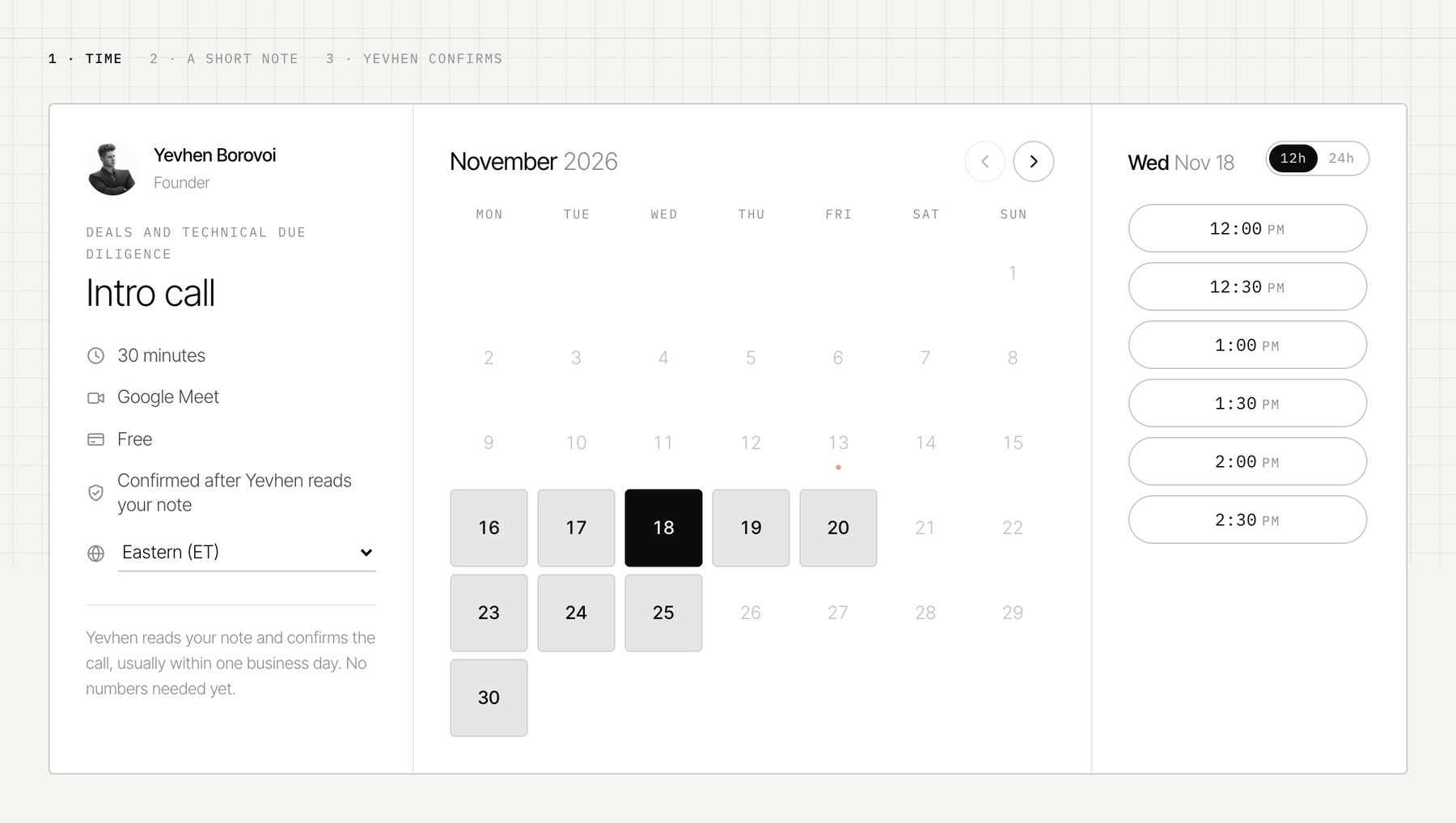
From the outside it is a calm page. The visitor sees a month, picks a day and gets the free times in their own time zone, detected by the browser and changeable by hand. After choosing a time they fill in a short form and get a confirmation email with a private link where they can move or cancel the call themselves. No account and no password are needed.
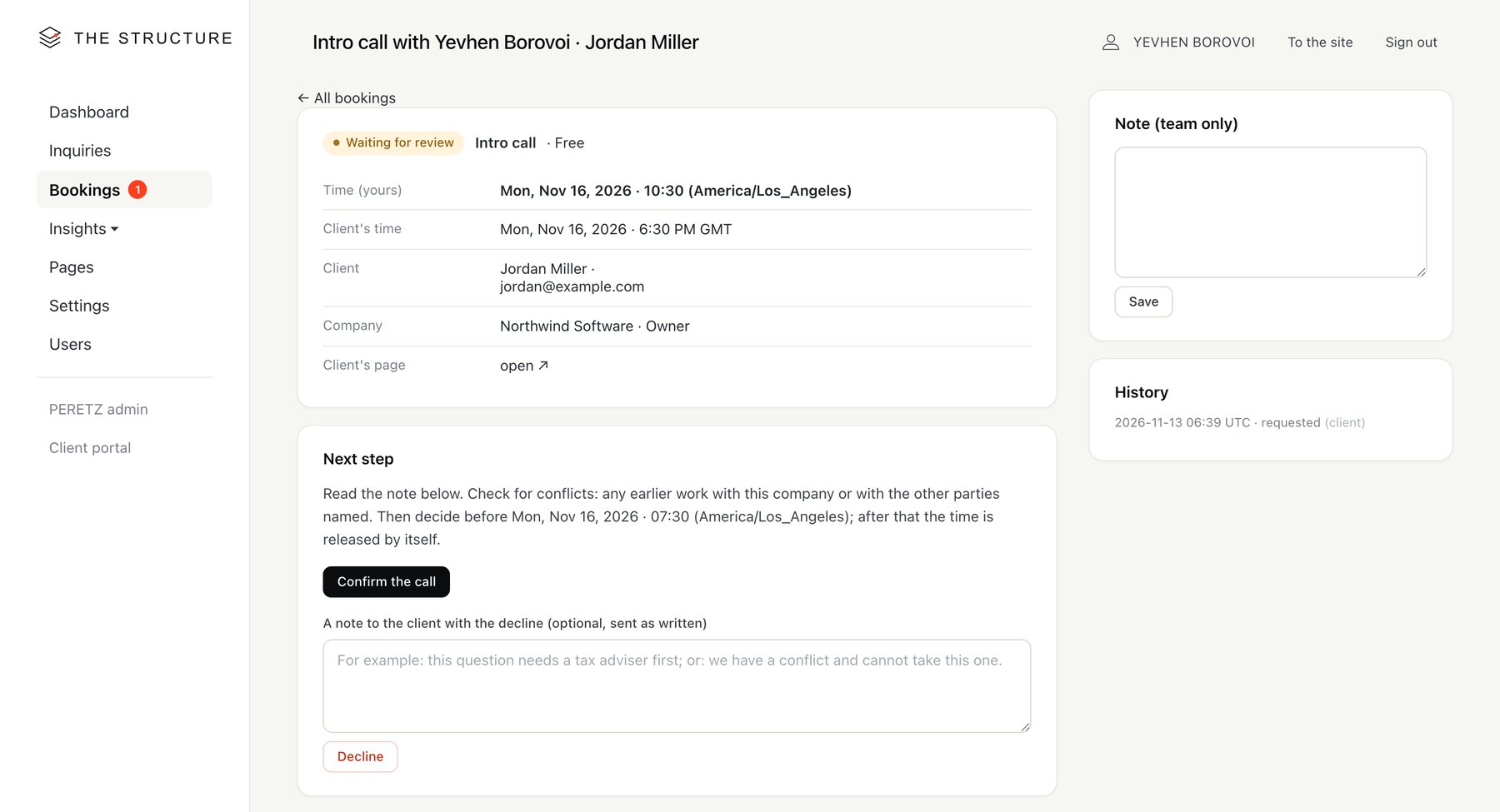
Inside, in the admin panel of the same Laravel application, each request opens as a card: who, when in both time zones, the form, the next step with one button, the history of everything that happened, a team note. Each host has a schedule page with weekly windows, days off, call length, buffers and notice periods, plus a button to connect their own Google account.
The client never sees the machinery: statuses, timers, the conflict check. They see a time, a confirmation and a Meet link that arrives once the call is confirmed.
The Google part
Google Calendar and Meet, step by step
This is the part where most people lose an afternoon, so here it is in order. You need a Google Cloud project, an OAuth consent screen and an OAuth client. No paid Google plan is required for your own use.
- Create a project in the Google Cloud console. Give it a clear name, for example "Company booking". Keep it separate from projects that hold other keys, such as Search Console access: different jobs, different risks.
- Enable the Google Calendar API in that project.
- Fill in the consent screen (Google Auth Platform, Branding): app name, support email, home page, and links to a privacy policy and terms of use. Google will not let you publish without them, so those pages must exist on your site first.
- Choose the audience. For a personal Gmail account this is External.
- Ask for the narrowest scopes. We use two calendar scopes: one to create and delete events, one to see busy times (free/busy). We do not read anyone's event contents.
- Publish the app. While it is in Testing, Google issues refresh tokens that expire in 7 days, and your calendar connection dies a week after you set it up. And nothing warns you: the booking page keeps taking requests, only the events with Meet links stop appearing, and the first to notice is a client without an invitation. In Production the token lasts. So the booking system does not wait for that client: when a host's calendar stops answering, the team gets a letter with what Google said and how to reconnect, at most once in 12 hours while it lasts, and the error stays on the schedule page in the admin.
- Create an OAuth client of type Web application and add the redirect address exactly as your app sends it, down to the trailing slash.
- Put the client ID and secret into the server environment (.env in Laravel), never into code, a repository or a chat window. If configuration is cached, rebuild the cache after the change.
After that each host clicks Connect Google in the admin and signs in with their own account. The app stores a refresh token per host and gets short-lived access tokens when needed. Google will show a warning that the app is not verified, because calendar scopes are sensitive. For your own staff that is acceptable. An unverified app is limited to 100 new users, so a product that connects customers' calendars has to pass Google's verification.
When a call is confirmed, the app creates an event in the host's calendar with the client as a guest and asks Google to attach a Meet conference. Google sends the invitation itself, so the client gets a normal calendar invite with the Meet link. When the call is moved, the event moves; when it is cancelled, the event is deleted and the guest is told.
In code it is one request. The parameter that is easy to miss is conferenceDataVersion=1: without it Google ignores the createRequest without an error, and the event comes back with no Meet link. sendUpdates=all is what makes Google send the invitation to the guest.
// the event, the client as a guest and a Meet link in one request
$response = Http::withToken($accessToken)->post(
    'https://www.googleapis.com/calendar/v3/calendars/primary/events'
    .'?conferenceDataVersion=1&sendUpdates=all',
    [
        'summary' => 'Intro call · '.$booking->name,
        'start' => ['dateTime' => $booking->starts_at->toIso8601ZuluString()],
        'end' => ['dateTime' => $booking->ends_at->toIso8601ZuluString()],
        'attendees' => [['email' => $booking->email, 'displayName' => $booking->name]],
        'conferenceData' => ['createRequest' => [
            'requestId' => $booking->token.'-'.time(),
            'conferenceSolutionKey' => ['type' => 'hangoutsMeet'],
        ]],
    ]
);

$meetUrl = $response->json('hangoutLink');
Free times
Slots, time zones and the traps
Showing free times sounds trivial until the first daylight saving change. These are the rules we settled on.
Everything is stored in UTC, the windows are defined in the host's time zone, and the client sees their own. Valeriia's hours are written as Tuesday and Thursday, 9:00 to 12:00 Pacific. A client in London and a client in Dubai see the same slots converted to their clock. The conversion uses the IANA time zone database through PHP's own date classes, never a fixed offset, because offsets change twice a year and not on the same dates in every country. On the morning after US clocks moved back in November, a hand-written offset would have shifted every slot by an hour.
The rest of the rules turned out to matter just as much:
- Several windows a day. A real working day has breaks: 6:00 to 9:00, 11:00 to 14:00 and 16:00 to 18:00 is three windows, not one, and the host sets them on the schedule page. A call has to fit wholly inside one window, so with one-hour calls the last morning slot is 8:00, never 8:30 running into the break. Quickly generated calendars often allow one range per day, or check only the start time and book a call straight across the gap.
- Buffers before and after each call, so calls never sit back to back.
- Notice: a paid call can be booked no sooner than 48 hours ahead, because the form has to be read and the payment made. The free intro call needs 24 hours.
- Horizon: no further than three weeks ahead, so the calendar does not promise times nobody has thought about.
- A weekly limit on paid first calls, so the advisor's week does not fill up with new reviews.
- Days off for public holidays, editable in the admin.
- Busy times from Google. Before slots are shown and again before a request is saved, the app asks Google for the host's busy periods. A dentist appointment typed into the phone calendar removes those slots from the site.
The classic bug of homemade calendars is double booking: two people open the page, both see 10:00 free, both click. We save a request inside a database transaction that checks the slot again at that moment, and the second person gets a polite message to choose another time.
Here is the core of it as it runs in The Structure, on SQLite. Our first version used Laravel's default transaction mode, DEFERRED, and a test with three requests for one time at the same moment showed the catch: a double booking never got through, but the losing requests got a "database is locked" error page instead of the polite message. With IMMEDIATE a transaction takes the write lock as it starts, so the requests queue up, and the second one finds the slot taken. Five rounds of the same test after the change: each time one booking and two polite refusals. On MySQL or PostgreSQL the same idea is a row lock, lockForUpdate() on the host's row, before the check.
// config/database.php, the sqlite connection
'busy_timeout' => 5000,
'transaction_mode' => 'IMMEDIATE',

// saving a request
$booking = DB::transaction(function () use ($data, $kind, $start) {
    // checked again inside the lock: our own bookings and Google busy time
    if (! Slots::isFree($kind, $start)) {
        throw new SlotTaken;
    }

    return Booking::create([
        ...$data,
        'kind' => $kind,
        'status' => 'requested',
        'starts_at' => $start,
    ]);
});
Store UTC, think in the host's zone, show the client's.
The lifecycle
Requested, approved, confirmed
A booking is not one record with a date. It moves through statuses, and each status has an owner and a deadline:
| Status | What it means | What happens next |
|---|---|---|
| Requested | The client chose a time and sent the form | The host reads it and approves or declines |
| Approved | The paid call passed review | The client gets a payment link valid for 24 hours |
| Confirmed | Paid, or a free call approved | Google event with Meet, reminders before the call |
| Done or missed | The call took place or the client did not come | Follow-up, an offer of a second call, the report |
| Expired, cancelled | Not reviewed, not paid or cancelled | The time returns to the calendar |
Deadlines are enforced by a scheduled command that runs every 15 minutes. It releases requests nobody reviewed 24 hours before the call, releases unpaid times, sends reminders and deletes old form answers. Without that heartbeat a booking system slowly fills with times that are neither free nor taken.
On shared hosting the scheduler had one surprise for us. The hosting panel runs cron jobs without a shell, so a job that starts with cd fails with exit code 127. The fix is full paths to PHP and to the artisan file, and a test run through the hosting's own cron wrapper before trusting it.
Clients manage their booking through the private link from the email. They can move or cancel a call up to 24 hours before it; a paid call cancelled that early is refunded in full. Payments go through Stripe Checkout, so card details never touch our server, and Stripe tells the app about a payment through a signed webhook rather than through the client's browser.
Data and trust
Who sees the answers
The form for a paid review asks about the company, the deal and the people involved. That is sensitive, and the service page of The Structure promises that only the advisor reads it. In code that promise became three rules:
- the answers are visible only to the host of that call; other admin users see the status and the time, not the content;
- answers are deleted 90 days after the report is sent, and 30 days after a request that went nowhere;
- notification emails to the team say that a request arrived and link to it, without the answers in the body.
The public booking pages set no cookies and keep no session. Bots are filtered with a hidden field, a time check and rate limits rather than a puzzle the client has to solve. Trust in a booking form is decided by small things like these, long before anyone joins the call.
Testing it
Before the first real client
We did not open everything at once. The booking stayed hidden behind a preview key while we tested, and each type of call has its own switch: Yevhen's free intro calls went public first, while Valeriia's paid reviews stay in preview until her calendar is connected and payments are live.
Two switches made testing safe. One stops all outgoing email while still logging what would have been sent. The other, active only while there are no payment keys, replaces Stripe with a test button. So we could walk the whole route, request, approval, payment, confirmation, cancellation, without writing to a real client or charging a card.
The live Google test was simple and convincing: approve a request, see the event with a Meet link appear in the calendar, cancel it, see the event disappear. The tests also found a real bug: after a test booking was deleted, an old admin tab still pointed to it and the cancel button returned a 404. Now a missing booking sends the admin back to the list.
Same engine
Clinics, schools, restaurants
The Structure is our own case, but the engine is not new to us. We have built booking modules for clinics, educational platforms and restaurants, and the core is always the same: resources, rules, statuses, notifications. What changes is the resource and the rules.
- A clinic books a doctor, often a room and sometimes equipment at the same time, with procedure lengths, preparation instructions and a rule about who may book a first visit online.
- An educational platform books seats in a group rather than a time with a person, with a capacity, a waiting list and payment before the place is held.
- A restaurant books a table for a party size and a time, with turnover between seatings, larger groups going to a manager for confirmation and a deposit on busy nights. We described how such a system joins tables, the market and delivery in one system for a restaurant, a market and delivery.
In each case the value of building it yourself is the same as for us: the booking follows the way the business already works and lands in its own systems, instead of the business adapting to a booking widget. That is what we mean when we talk about web applications built around your business.
AI and booking
Can it just be vibe-coded
Honestly, a form with free times can be generated by an AI tool in an evening, and it will look fine. The trouble sits in the list above: time zones across a clock change, double booking, deadlines that release times, refresh tokens that die in a week, payments confirmed by webhook and answers that must stay private. None of these show up in a demo, all of them show up in the first month with real clients.
We use AI agents in our own work every day, and they wrote part of this calendar too. The difference is that every change was read by a person, tested on the paths that carry money and access, and checked against the rules before going live. We wrote about the risks of code nobody reviewed in prompt injection in AI coding agents. If your team builds in Laravel already, this guide is enough to start. If you would rather have it built into your site, CRM or portal, our Laravel developers do it as a normal project, and the code stays yours.
FAQ
Questions about building your own booking calendar
Is it cheaper to build a booking calendar than to pay for Calendly?
For one person with simple slots, no: a service costs less than any development. Building pays off when booking is part of a process with approvals, payments after review, several hosts or sensitive forms, and when you want it inside your own site or CRM without paying for tiers and add-ons year after year.
Do I need a paid Google Workspace plan to create Google Meet links?
No. We connected a personal Google account: the Calendar API creates the event and asks for a Meet conference, and Google sends the invitation. You need a Google Cloud project with the Calendar API enabled, a consent screen and an OAuth client.
Why did my Google Calendar connection stop working after a week?
Most likely the OAuth app is still in Testing. For external apps in that status Google issues refresh tokens that expire in 7 days. Publish the app to Production and connect the account again.
How do you prevent two people from booking the same time?
The slot is checked again inside a database transaction at the moment the request is saved, together with the host's busy times from Google. If someone took it a second earlier, the second visitor is asked to choose another time.
Can AI write a booking system for me?
It can write a good first version quickly. Review it on the points where homemade calendars break: time zones and clock changes, double booking, expiring tokens, payment webhooks, deadlines and privacy of the form. Those parts need a person who reads the code and tests them.
Sources
- Create events, Google Calendar API
- Freebusy: query, Google Calendar API reference
- Using OAuth 2.0 to access Google APIs: refresh token expiration
- Unverified apps, Google Cloud Platform Console Help
- Stripe Checkout, Stripe documentation
Booking that should follow your process, not a widget's? Let's look at what your calendar has to do.
- Share
-

-

-

-

One notification a week with the new PERETZ articles. Nothing else.